Meter
Tachometer Malfunction
In this manual: Meter
22steps
~132min
4/5difficulty
Done 0 of 22
DESCRIPTION
The meter CPU receives the engine revolution signal from the ECM via the direct lines. The meter CPU displays engine revolution data that is calculated based on the data received from the ECM.
WIRING DIAGRAM
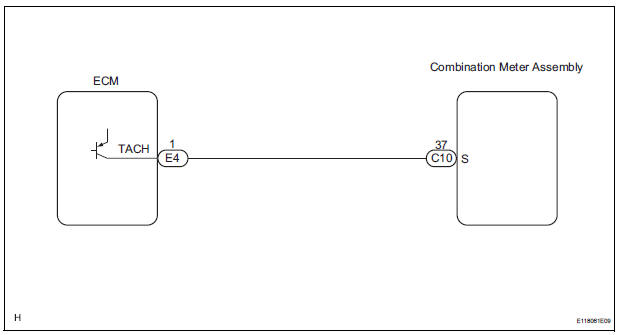
INSPECTION PROCEDURE
1 PERFORM ACTIVE TEST BY INTELLIGENT TESTER
- Connect the intelligent tester to the DLC3.
- Turn the switch to the ON position.
- Turn the tester ON.
- Enter the following menus: DIAGNOSIS / OBD/MOBD / METER / ACTIVE TEST.
- Check the operation by referring to the values in the table below.
METER:

OK: Needle indication is normal.
2 READ VALUE OF INTELLIGENT TESTER (ENGINE SPEED SIGNAL)
- Connect the intelligent tester to the DLC3.
- Turn the switch to the ON position.
- Turn the tester ON.
- Enter the following menus: DIAGNOSIS / OBD/MOBD / METER / DATA LIST.
- Check the values by referring to the values in the table below
METER:

OK: Engine speed displayed on the tester is almost the same as the actual engine speed.
REPLACE COMBINATION METER ASSEMBLY
3 READ VALUE OF INTELLIGENT TESTER (ENGINE SPEED SIGNAL)
- Connect the intelligent tester to the DLC3.
- Turn the switch to the ON position.
- Turn the tester ON.
- Enter the following menus: DIAGNOSIS / OBD/MOBD / ENGINE / ACTIVE TEST.
- Check the values by referring to the values in the table below.
ENGINE:

4 CHECK HARNESS AND CONNECTOR (COMBINATION METER - ECM)
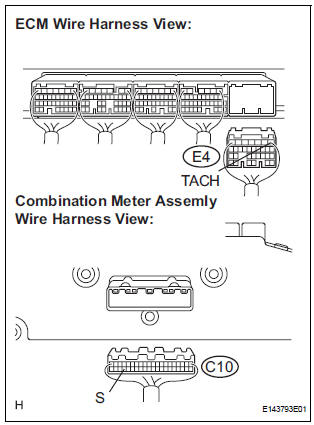
- Disconnect the E4 and C10 connectors.
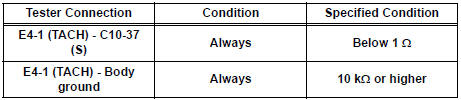
- Measure the resistance according to the value(s) in the table below.
Standard resistance
5 INSPECT COMBINATION METER ASSEMBLY
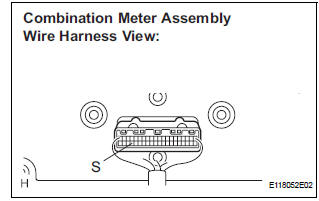
- Check the input signal waveform.
- Remove the combination meter with the connector still connected.
- Connect the oscilloscope to terminal C10-37 (S) and body ground.
- Start the engine.
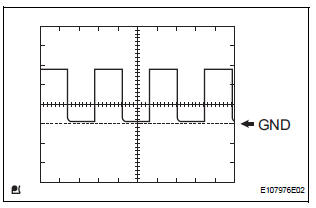
- Check the signal waveform according to the condition(s) in the table below.

OK: The waveform is displayed as shown in the illustration
REPLACE ECM
Test yourself
A quick Toyota Sienna quiz: every answer comes with an explanation and a link to the manual page.
Was this page helpful?