BMW Gesture Control
Gesture Control in the BMW 5 (VII generation / G30 & G31) offers an innovative way of operating the vehicle. Certain functions can be triggered by simple hand movements, which are detected by a camera in the headliner. This section describes common gestures, setting options and system limits, a forward-looking feature that combines convenience and safety.
Vehicle equipment
This chapter describes all standard, country-specific and optional equipment offered in the model series. It therefore also describes equipment that is not available in a given vehicle, for example due to the selected optional equipment or country variant. This also applies to safety-related functions and systems. When using the corresponding functions and systems, observe the applicable laws and regulations.
Principle
With BMW Gesture Control, some iDrive functions can be operated by hand movements alone.
Overview
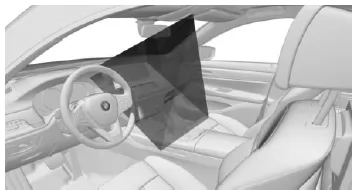
Gestures performed below the interior rearview mirror are detected by a camera in the headliner.
Activating/deactivating
Via iDrive:
- "My Vehicle"
- "iDrive settings"
- "Gestures"
- "Gesture Control"
Settings
- "Display operating aids": The possible gesture is shown on the Control Display.
- "Acoustic feedback": When the gesture is recognized, an acoustic signal sounds.
Possible gestures
| Gesture | Operation | Function |
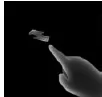 |
Move index finger back and forth toward the display. | Accept phone call. |
Confirm Check Control message.
Select highlighted list entry during voice input.

Close pop-up.
End voice input

Gesture is recognized after approx. one circular movement.

Gesture is recognized after approx. one circular movement.


Perform the gestures below the interior mirror and to the side of the steering wheel.
Perform the gestures clearly.
The gestures can also be performed from the front passenger side.
Assign gesture individually
Via iDrive:
- "My Vehicle"
- "iDrive settings"
- "Gestures"
- "Function assignment"
- Select the desired setting.
System limitations
Gesture recognition by the camera may be impaired by the following conditions:
- The camera lens is covered.
- Objects are located on the interior mirror.
- The camera lens is dirty. Clean camera lenses, see page 346.
- The gesture is performed outside the recognition area.
- Wearing gloves or jewelry.
- Smoking in the vehicle interior.
The BMW gesture control in the 5 Series G30/G31 sets new standards in operating convenience. Simple hand movements allow essential functions such as volume adjustment or answering calls to be controlled – a true highlight of modern vehicle technology.
A particular advantage is that gesture control also contributes to safety, as the driver can keep their eyes on the road. The option to assign functions individually further enhances personal convenience.
Test yourself
A quick BMW 5 quiz: every answer comes with an explanation and a link to the manual page.