Favorite buttons
The favorite buttons in the BMW 5 (VII generation / G30 & G31) can be used to quickly call up frequently used functions such as radio stations, telephone numbers or navigation destinations. This section explains how to assign, delete and display these buttons, conveniently via iDrive. Ideal for drivers who value personalization and quick access to central functions.
General
Functions of iDrive can be stored on the favorite buttons and called up directly, e.g. radio stations, navigation destinations, telephone numbers and shortcuts to menus or pages of the Integrated Owner's Manual.
The settings are saved for the driver profile currently in use.
Saving a function
- Select the function via iDrive.
 Press and hold the desired button until a signal sounds.
Executing a function
 Press the button.
The function is executed immediately. This means that, for example, selecting a telephone number also establishes the connection.
Displaying button assignments
Touch the buttons with your finger. Do not wear gloves or use objects.
The button assignments are shown at the upper edge of the screen.
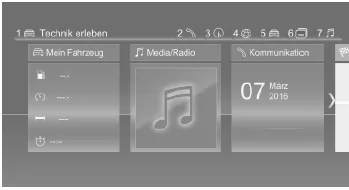
Deleting button assignments
- Buttons 1 and
 press and hold simultaneously for approx. 5 seconds.
- "OK"
The favorite buttons in the BMW 5 G30/G31 make it easier to access frequently used functions and contribute significantly to personalization. Whether radio station, navigation destination or telephone number, everything is reachable with a single press of a button.
This intelligent solution saves time and increases safety, as the driver hardly needs to take their hands off the steering wheel. This makes the BMW 5 G30/G31 an example of well-thought-out ergonomics in the vehicle.
FAQQuestion 1: Can I reassign the favorite buttons at any time?
Answer: Yes, the buttons can be reprogrammed at any time by selecting the desired function and pressing and holding the button.
Question 2: Are the stored favorites retained in the driver profile?
Answer: Yes, the favorite settings are linked to the driver profile currently in use and are loaded automatically.
Test yourself
A quick BMW 5 quiz: every answer comes with an explanation and a link to the manual page.