Entering a Street, House Number and Intersection
After entering the street, you can specify an intersection or a house number.
Entering a Street and Intersection
1. Select "Street" or the street name already shown on the screen and press the controller.
2. Enter the street name in the same way as the destination name.
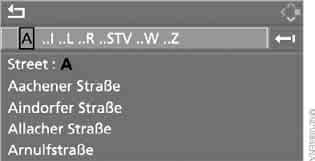
Select the intersection in the same way as the street.
Entering a Street Without a Destination City
The street can be specified without entering the place name. In this case, the system offers a list of all streets in the selected country. The corresponding place is specified after the street name.
A selected place can be deleted. This makes sense if the required street is located in another place.
1. Move to the upper field.
Arrow is selected by default.
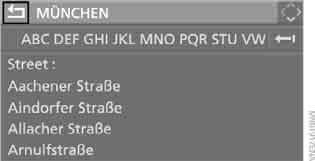
2. Turn the controller clockwise until the prompt to enter a street appears, and press the controller.

3. Move to the second field from the top and enter the street name.
Entering the building number
Any building numbers recorded on the navigation DVD can be entered.
1. Select "Building number" and press the controller.
2. Enter the building number: select the digits, confirming each entry by pressing the controller.
3. Move to the third field from the top.
Turn the controller to select the building number and press the controller.
Test yourself
A quick BMW X3 quiz: every answer comes with an explanation and a link to the manual page.