Traffic information during route guidance
If obstructions are located on the planned route, traffic information is displayed by symbols with a red border.
The system behaves depending on whether the "Dynamic route" option has been selected.
Display of traffic problem areas
When the navigation system receives a message about a traffic problem area or congestion via TMC and the "Dynamic route" option is not selected, it reports, for example, the length of the traffic jam 100 km before the area.
Before approaching this area, it informs you of the last opportunity to turn off.
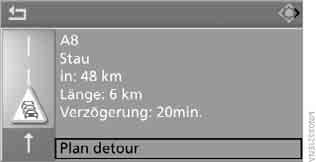
Select "Plan detour" and press the controller.
The system will plan a route to detour around the traffic jam.
This information also appears when a different menu is open on the control display.
Dynamic route calculation
When the "Dynamic route" option is selected, the system automatically changes the route when traffic problem areas appear. In this case, it does not display traffic problem areas along the previously calculated route.
Depending on the road type and the nature and length of the traffic jam, the route may be calculated so that it still passes through areas with restricted traffic flow.
Test yourself
A quick BMW X3 quiz: every answer comes with an explanation and a link to the manual page.