Rear window management from the driver's door control panel
In this manual: Window lifters
~1min read
Important:The switches on the driver's door panel take priority over the rear window lifters. A sequential command from the driver's door panel switches may be interrupted by the rear switches.
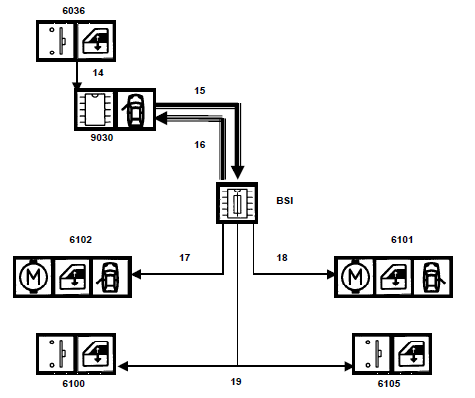
Block diagram
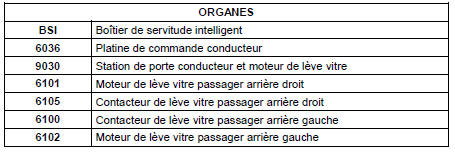
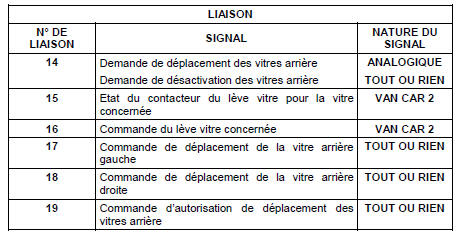
Rear window management from the driver's door control panel block diagram
Key:
single arrow: wired link,
triple arrow: multiplexed link.
Functional description
FUNCTIONAL DESCRIPTION
A command on one of the window switches generates a single voltage level per command
The door module detects the voltage level and sends a multiplexed message of the requested command to the BSI
The BSI cancels the rear window lockout command. The enable indicator goes out.
The BSI controls the window movement
Rear window lockout
A switch built into the driver's control panel enables or disables use of the rear window lifters.
Switch pressed in: the rear window lifters can be operated from the rear switches.
Switch released: the rear window lifters cannot be operated from the rear switches. The rear window lifters can still be operated from the driver's control panel.
The door module reads the rear window lockout command. The door module sends the BSI an enable or disable message for the rear window lifters.
Disabled: the BSI no longer supplies power to the rear window movement enable control. The enable indicator in the rear switches goes out.
Enabled: the BSI supplies power to the rear window movement enable control. The enable indicator in the rear switches comes on.
?
Test yourself
A quick Citroen C5 Aircross quiz: every answer comes with an explanation and a link to the manual page.