MULTIMEDIA
Dynamometer (Dyno)
In this manual: MULTIMEDIA
~1min read
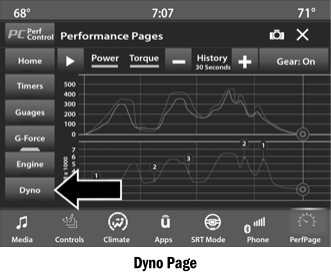
The system will begin plotting graphs for power and torque (upper graph) and engine speed (lower graph). The graph will occupy the right side of the page (based on the selected history time). Once the right side of the page is reached, the graph scrolls from the right side, always showing the most recently recorded sample.
The following options are available:
- Pressing the STOP button will stop the graph. Selecting Play will clear the graph and restart the process.
- Press the + or – buttons to change the graph history. Selectable options are "30", "60", "90" or "120" seconds. The graph will expand or contract depending on the selected setting.
- Select the "Gear" display setting to turn on gear markers on the graph. This setting is only available for vehicles with an automatic transmission.
NOTE:
The Gear On/Off function will only be displayed if your vehicle is equipped with an automatic transmission.
Test yourself
A quick Dodge Charger quiz: every answer comes with an explanation and a link to the manual page.
Was this page helpful?