G-Force
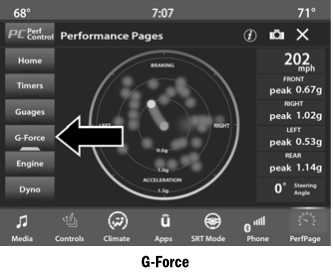
When this screen is selected, all four G-Force values and the steering wheel angle are displayed.
When G-Force is selected, the following functions are available:
- Vehicle Speed:
Measures the current vehicle speed in mph or km/h, starting from zero with no maximum value.
- Front G-Force:
Measures the peak braking force at the front of the vehicle.
- Right G-Force:
Measures the peak force on the right side of the vehicle.
- Left G-Force:
Measures the peak force on the left side of the vehicle.
- Rear G-Force:
Measures the peak acceleration force at the rear of the vehicle.
NOTE:
The front, right, left and rear G-Force values are peak values. These readings can be reset by clearing the G-Force peak on the instrument cluster.
- Steering Wheel Angle
The steering wheel angle uses the steering wheel angle sensor to measure the degree of steering wheel rotation relative to the zero (straight-ahead) reference angle. A measured reference angle of zero degrees indicates the steering wheel is centered.
The friction circle display shows the instantaneous G-Force as the primary point and the previous G-Force as points inside the circle. The system records the previous G-Force for three minutes. If multiple samples exist at a given point, the color of the point changes from blue to red. Vectors that occur more frequently will be shown in red; rare vectors will be shown in blue.
Test yourself
A quick Dodge Charger quiz: every answer comes with an explanation and a link to the manual page.