Timers
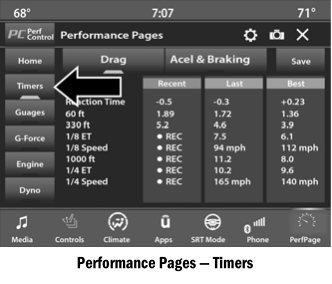
When the Timers page is selected, you can select the Drag or Acceleration & Braking tabs. The following will be displayed:
- Recent
The most recent successful performance timer run. If a run does not finish within the timer limits or is aborted, the displayed values will revert to the most recent valid run.
- Last
The last recorded successful performance timer run.
- Best
The best recorded performance timer run, excluding braking data.
- Save
Pressing the Save button saves the currently displayed page: Recent/Last/Best. Any saved run beyond 10 will overwrite the last saved run in the Uconnect system storage. The save function works as described below:
NOTE:
Pressing the camera icon in the upper right corner of the screen at any time will save a screenshot of the currently displayed screen to the connected USB device.
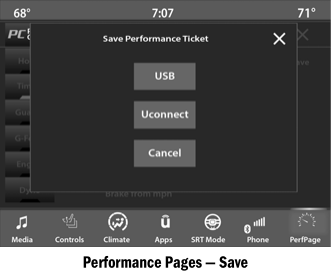
- With a USB drive installed, press the USB button to save the performance data.
- Press the Uconnect button to save the current timer data to the owner's web page.
NOTE:
The Uconnect parameter will be unavailable or will not be displayed if the vehicle does not have an active Uconnect account associated with it.
- Press the Cancel button to return to the Timers page.
The tabs on the Timers page contain the following timers:
- Reaction Time
Measures the driver's reaction time when launching from a standstill against a simulated drag strip countdown tree (Sportsman tree simulated after 500 ms), displayed on the instrument cluster.
NOTE:
Drag timers (RT, 60 ft [20 m], 330 ft [100 m], 1/8 mile [200 m], 1000 ft [300 m] and 1/4 mile [400 m]).
NOTE:
Acceleration and braking timers (0-60 mph [0-100 km/h], 0-100 mph [0-160 km/h], brake from mph [km/h] and braking distance ft [m]).
- 0-60 mph (0-100 km/h)
Displays the time required for the vehicle to accelerate from 0 to 100 km/h.
- 0-100 mph (0-160 km/h)
Displays the time required for the vehicle to accelerate from 0 to 160 km/h.
- 60 ft (20 m) Eastern Time
Displays the time required for the vehicle to travel 60 ft (20 m).
- 330 ft (100 m) Eastern Time
Displays the time required for the vehicle to travel 330 ft (100 m).
- 1/8 mile (200 m) Eastern Time
Displays the time required for the vehicle to travel 1/8 mile (200 m).
- 1/8 mile (200 m) mph
Displays the vehicle speed when the 1/8 mile (200 m) point is reached.
- 1000 ft (300 m) Eastern Time
Displays the time required for the vehicle to travel 1000 ft (300 m).
- 1/4 mile (400 m) Eastern Time
Displays the time required for the vehicle to travel 1/4 mile (400 m).
- 1/4 mile (400 m) mph
Displays the vehicle speed when the 1/4 mile (400 m) point is reached.
- Braking Distance in Feet (Myers)
Displays the distance the vehicle travels to come to a complete stop.
NOTE:
The distance measurement will be interrupted if the brake pedal is released or the parking brake is applied before the vehicle comes to a complete stop.
- Brake from mph (km/h)
Displays the speed of the vehicle when the brake pedal is pressed.
NOTE:
The braking distance and speed timers show "ready" only when the vehicle is moving at a speed above 30 mph (48 km/h).
Test yourself
A quick Dodge Charger quiz: every answer comes with an explanation and a link to the manual page.