Eight-Speed Automatic Transmission
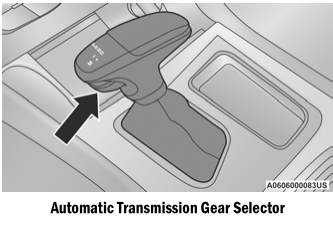
The transmission gear range is displayed both on the shift selector and in the instrument cluster. To select a gear range, press the release button on the shift selector and move the selector rearward or forward. To move the transmission out of PARK, the engine must be running and the brake pedal must be pressed. You must also press the brake pedal to shift from NEUTRAL to DRIVE or REVERSE when the vehicle is stopped or moving at low speed. Select the DRIVE range for normal driving.
NOTE:
- The transmission electronics are self-adjusting; therefore, the first few shifts on a new vehicle may be somewhat harsh. This is normal, and the shifts will refine within the first several hundred miles (kilometers).
- If there is a mismatch between the shift selector position and the actual transmission range (for example, the driver selects PARK while the vehicle is moving), the position indicator will flash continuously until the selector is returned to the correct position, or the requested shift may be completed.
The electronically controlled transmission adapts its shift schedule based on driver input, as well as environmental and road conditions. Shift from DRIVE to PARK or REVERSE only when the accelerator pedal is released and the vehicle is stopped. Be sure to keep your foot on the brake pedal when shifting between these ranges.
The transmission shift selector provides PARK, REVERSE, NEUTRAL, DRIVE and MANUAL (AutoStick) shift positions. Manual shifting can be performed using the AutoStick shift control. Moving the shift selector forward (-) or rearward (+) in MANUAL (AutoStick) mode (next to the DRIVE position) manually selects the gear, and the current gear will be displayed in the instrument cluster.
NOTE:
If the shift selector cannot be moved to PARK, REVERSE or NEUTRAL (when pressed forward), it is probably in the MANUAL (AutoStick, +/-) position (next to the DRIVE position). In MANUAL (AutoStick) mode, the gear is displayed in the instrument cluster (such as M1, M2, M3, etc.). Move the shift selector to the right (to the DRIVE [D] position) to access PARK, REVERSE and NEUTRAL.
Test yourself
A quick Dodge Charger quiz: every answer comes with an explanation and a link to the manual page.