Using Voice Recognition
This system lets you control several functions using voice commands. This allows you to keep your hands on the steering wheel and stay focused on your surroundings.
Tips
Keep the vehicle cabin as quiet as possible.
Wind noise from open windows and road vibrations may prevent the system from recognizing voice commands.
Before giving a voice command, wait until the single beep signals the end of the system prompt.
Any command spoken before this signal is not recorded by the system.
Speak naturally, without long pauses between words.
You can interrupt the system during a command at any time by pressing the Voice button. You can also cancel a voice session at any time by pressing and holding the Voice button.
Starting a Voice Session
 Press the Voice button. A
list of available commands appears on the screen.
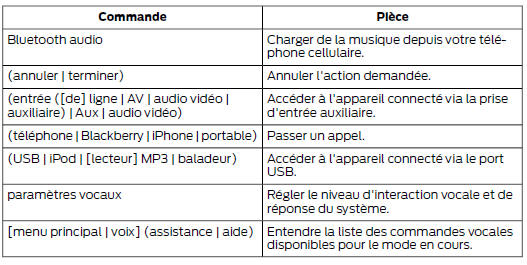
System Interactions and Responses
The system responds with a range of beeps, prompts, questions and voice confirmations, depending on the situation and the interaction level you have selected. You can customize the voice recognition system so that it gives more or fewer instructions and responses.
The default setting is a high interaction level to help you learn how to use the system. You can change these settings at any time.
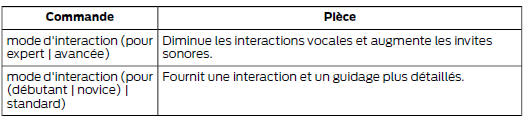
Setting the Interaction Level
 Press the Voice button.
When the system is ready:

Then say one of the following commands:
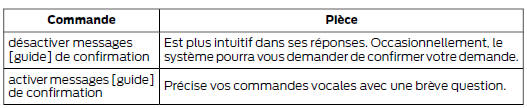
Confirmation prompts are brief questions the system asks when it is unsure of your request or when there are several possible responses to your request. For example, the system may ask whether the command phone is correct.
Press the Voice button. When the system is ready:

Then say one of the following commands:
The system displays suggestion lists when it considers that there are several plausible responses to your voice commands. When this setting is on, the system may ask you to specify up to four options.
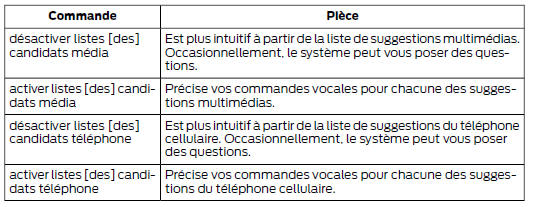
Changing Voice Settings
You can change the voice settings from the information and entertainment screen.
Press the MENU button.

Test yourself
A quick Ford Mondeo quiz: every answer comes with an explanation and a link to the manual page.