Using Adaptive Cruise Control
WARNINGS
- Always stay alert to changes in traffic conditions, particularly when using adaptive cruise control. Adaptive cruise control cannot replace attentive driving. Failure to observe the warnings below or lack of attention to the road may result in a collision, serious injury or death.
- This system is not a collision warning or avoidance system. You must take action if the system does not detect a vehicle ahead of you.
- Adaptive cruise control does not detect stationary vehicles or vehicles travelling at a speed below 10 km/h.
- This system does not brake for slow or stationary vehicles, pedestrians, objects on the road, approaching vehicles or vehicles crossing the road.
- Do not use the system when entering or leaving a motorway.
- Do not use adaptive cruise control on winding roads, in heavy traffic or when the road surface is slippery. This may cause loss of vehicle control and serious or fatal injury.
- Do not use the system when visibility is poor, such as in fog, heavy rain, showers or snow.
- Do not use the system when towing a trailer with aftermarket electronic trailer brakes. Aftermarket electronic trailer brakes do not work correctly when you activate the system, because the brakes are controlled electrically.
The system is designed to help you maintain a gap between your vehicle and the vehicle ahead. If no vehicle is ahead of yours, the system maintains a set speed. The system is designed to improve the operation of your vehicle when following other vehicles traveling in the same lane and in the same direction. You can select one of five gap settings.
The system uses a radar sensor that projects a beam directly forward from your vehicle.
This beam detects any vehicle within the area scanned by the system.
If no vehicle is ahead of yours, the system maintains the set speed.
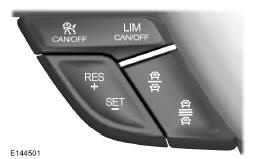
Use the controls on the steering wheel to operate the system.
Switching the system on
Press and release the CAN/OFF button of the adaptive cruise control.
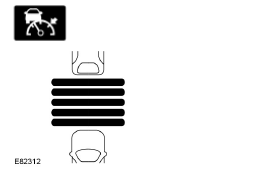
The cruise control indicators, SET mph (kph), the current gap setting indicator and Standby mode appear in the instrument cluster.
Setting a speed
- Drive at the desired speed.
- Press and release the SET- button.
- The information display shows a green indicator, the current gap setting and the desired speed.
- Take your foot off the accelerator pedal.
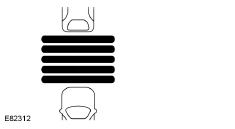
- When the system detects a vehicle ahead of you, it appears on the display above the horizontal lines.
Note: when adaptive cruise control is active, the set speed shown on the information display may differ slightly from the speed shown by the speedometer.
Changing the Set Speed
- Press the accelerator pedal or the brake pedal until the desired speed is reached. Press and release the SET- button.
- Press and hold the RES+ or SET- button until the desired speed appears on the information display. The vehicle speed will change gradually to reach the selected value.
- Press and release the RES+ or SET- button. The set speed changes in increments of approximately 1 km/h.
The system may apply the brakes to reach the new set speed for the vehicle. The set speed is continuously displayed on the information display when the system is active.
Cancelling the set speed
Press the brake pedal or the clutch pedal longer, or press the CAN/OFF button of the adaptive cruise control before releasing it. The last set speed is displayed crossed out.
Resuming the Set Speed
Press and release the RES+ button. The vehicle resumes the previous set speed and gap setting. The set speed is continuously displayed on the information display when the system is active.
Deactivating the system
Press the CAN/OFF button of the adaptive cruise control when the system is in standby mode or switch off the ignition.
Note: the set speed is cleared when you deactivate the system.
Following a vehicle
WARNINGS
- When following a vehicle, your vehicle does not decelerate automatically to a stop and may not decelerate quickly enough to avoid a collision if the driver does not intervene. You must always apply the brakes when necessary. Failure to follow this warning may result in a collision and serious or fatal injury.
- Adaptive cruise control only warns you of vehicles detected by the radar sensor. In some cases, there may be no warning or the warning may be delayed. You must always apply the brakes when necessary. Failure to follow this warning may result in a collision and serious or fatal injury.
When a vehicle ahead of you enters your lane or a slower vehicle is ahead of you in your lane, your vehicle speed adjusts to maintain a preset gap.
The lead vehicle indicator illuminates.
Your vehicle maintains a constant gap to the vehicle ahead until:
- the vehicle ahead accelerates above the set speed;
- the vehicle ahead leaves your lane or is out of range;
- the vehicle speed drops below 20 km/h;
- a new gap is set.
The system applies the brakes to slow your vehicle and maintain a sufficient safety gap to the vehicle ahead. The maximum braking the system can apply is limited. You can override the system by applying the brakes yourself.
If the system determines that its maximum braking is insufficient, an audible warning sounds and a message appears on the information display while the system continues to brake.
The system is designed to assist you by warning you of the risk of a collision with the vehicle ahead.
The system is designed to alert you using audible warnings and warning messages on the information display.
Brake assist is activated to provide full braking effectiveness and to reduce the severity of a collision with the vehicle ahead.
Note: the brakes sometimes make a noise when adjusted by the adaptive cruise control system.
Gap setting

- Decrease gap.
- Increase gap.
You can increase or decrease the gap between your vehicle and the vehicle ahead by pressing the gap control.
Note: you must select a gap that is appropriate for the driving conditions.

The selected gap appears on the information display as shown by the bars in the illustration. Five gap settings are available.
Note: the gap setting is time-based; therefore, the distance automatically regulates your speed.
Adaptive cruise control gap settings

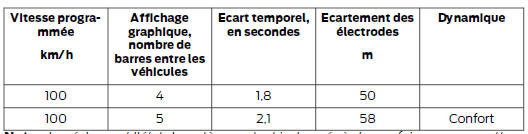
Note : the settings and system status remain unchanged each time you switch the ignition on.
Manual control of the system
WARNING
When the driver takes manual control of the system by pressing the accelerator pedal, the system does not automatically apply the brakes to maintain the gap to the vehicle ahead.
You can exceed the set speed and override the gap by pressing the accelerator pedal.
 When you switch to manual control,
the green indicator lights up and the lead vehicle indicator no longer appears in the information display.
The system is reactivated when you release the accelerator pedal. The vehicle speed decreases to reach the set speed, or a lower speed if a slower vehicle is ahead of you.
Automatic deactivation
The system does not operate below 20 km/h. If the vehicle is traveling at a lower speed, a warning tone sounds and automatic braking is released.
The system may be deactivated automatically if:
- The tires lose grip.
- The engine speed is too low.
- You apply the parking brake.
Note: if the engine speed is too low, the information display shows that the engine speed is too low. Shift to a lower gear (manual transmission only) to prevent automatic deactivation.
Driving on gradients
You must use a lower gear when the system is active during prolonged situations with steep gradients, for example in mountainous areas. In these situations, additional engine braking is needed for the system to reduce the load on the vehicle's conventional braking system and prevent the brakes from overheating.
Note: a warning tone sounds and the system switches off if the brakes are applied for a prolonged period.
This shutdown allows the brakes to cool. The system resumes normal operation when the brakes have cooled.
Detection beam problems
The radar sensor has a limited field of view. In some situations it may not detect a vehicle, or it may detect a vehicle later than expected. The lead vehicle indicator does not light up if the system does not detect a vehicle ahead of you.
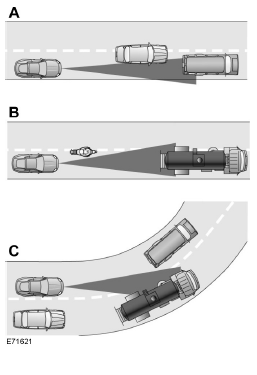
Certain detection faults may occur:
- Vehicles that cut into your lane can only be detected once they have fully entered your lane.
- Motorcyclists may not be detected, or may not be detected in time by the system.
- When vehicles ahead of you enter or exit a bend. The detection beam does not follow the curves of tight bends.
In these cases, the system may brake late or unexpectedly. You must stay alert and take action if necessary.
If something strikes the front of your vehicle or if it is damaged, the radar detection area may be altered. This may cause false detections or a failure to detect a vehicle.
Contact your authorized dealer as soon as possible.
System unavailable
The following conditions may cause the system to switch off or prevent it from being activated when needed:
- A sensor blockage.
- Brake overheating.
- A fault in the system or in a related system.
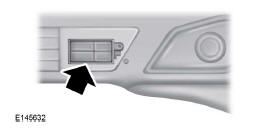
Sensor blocked
A message is displayed if an object is interfering with the radar signals sent by the sensor.
The sensor is located on the lower grille. The system cannot detect vehicles ahead and does not operate if an object is interfering with the radar signals.
Keep the front of your vehicle free of dirt, metal parts, or any other objects. Front vehicle protection and aftermarket lights may also block the sensor.
The following table lists the possible causes of the messages and the actions to take.
| Cause | Action |
| The radar surface in the grille is dirty or obstructed in some way. | Clean the grille surface in front of the radar or remove the object causing the obstruction. |
| The radar surface in the grille is clean, but the message is still displayed. | Wait a moment. The radar may take a few minutes to detect that the interference has stopped. |
| Heavy rain or snow interferes with the radar signals. | Do not use the system in these conditions, as it may not detect vehicles ahead of you. |
| Puddles, snow or ice on the road may interfere with the radar signals. | Do not use the system in these conditions, as it may not detect vehicles ahead of you. |
A blockage warning may be triggered when there is no blockage. A false blockage condition clears after an ignition cycle.
Normal cruise control
WARNING
Normal cruise control does not brake if vehicles ahead of you are slower. You must always know which mode you have selected and apply the brakes if necessary.
You can manually switch adaptive cruise control to normal cruise control mode using the information display.
 The
cruise control indicator replaces the adaptive cruise control indicator if you select normal cruise control. The gap setting is not displayed, the system does not react automatically to the behavior of vehicles ahead of you, and automatic braking is disabled. The system recalls the last setting selected when you start your vehicle.
Test yourself
A quick Ford Mondeo quiz: every answer comes with an explanation and a link to the manual page.