Audio remote control switches
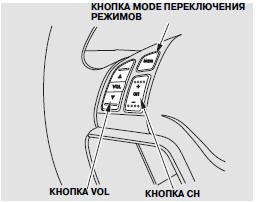
Three audio remote control switches are located on the steering wheel.
These switches allow you to control the main audio system functions without taking your hands off the steering wheel.
The VOL switch is used to increase or decrease
 the volume level.
Press and hold the desired side of the switch until the required volume level is reached, then release it.
The MODE switch is used to change the audio system mode. Each press of this switch cycles through the FM, AM (MW), AM (LW) bands, compact disc playback mode (if a disc is loaded), or the mode of an external device connected through the AUX jack or the USB connector cable. You can select the FM1 and FM2 frequency bands if the automatic selection function is not used.
To change radio stations, use the CH switch. Each short press on the (+) side of this switch causes the audio system to tune to the next preset radio station in the selected frequency band. Pressing the (–) side of the CH switch causes the system to tune to the previous station.
To activate the station seek function across the entire band, press and hold the (+) or (–) side of the CH switch until you hear a beep. The radio will search for a station with a strong signal in the higher or lower part of the frequency band relative to the current setting.
During compact disc playback, the system skips to the beginning of the next MP3 or WMA file each time the (+) side of the CH switch is pressed. The first press of the (–) side of the CH switch takes the system to the beginning of the current track (current file). Each subsequent press of the (–) side of the switch takes the system to the beginning of the previous track (previous file).
The display will show the sequence number of the track or file being played and the playback time. If the compact disc contains text information or is recorded in MP3 or WMA format, additional information (track title, file name, folder name, etc.) will be shown in the display.
When using MP3 or WMA discs, you can use the folder search function. To go to the first file of the next folder, press and hold the (+) side of the CH switch until you hear a beep. Pressing the (–) side of the CH switch takes the system to the previous folder.
When playing files on a USB storage device or iPod connected via a USB cable, press the upper part (+) of the CH button to skip to the beginning of the next file. Press the lower part (-) of the button to return to the beginning of the current file. Press the (-) side of the button again to return to the beginning of the previous file.
When playing files on a USB storage device, you can also use the folder search function.
To turn on this function, press and hold either side of the CH button until you hear a beep.
For vehicles equipped with a CD changer built into the control panel
When playing a standard audio CD that does not contain MP3 or WMA compressed audio tracks, use the search function to select discs.
To skip to the beginning of the next disc, press and hold the upper part (+) of the CH button until you hear a beep. To skip to the beginning of the previous disc, press and hold the lower part (-) of the CH button.
For vehicles equipped with a navigation system
To skip to the next file when playing a memory card, press the upper part (+) of the CH button. Press the lower part (-) of the CH button to skip to the previous file.
Test yourself
A quick Honda CR-V quiz: every answer comes with an explanation and a link to the manual page.