Setting the current time
For vehicles not equipped with a navigation system
To set the current time, press and hold the CLOCK (FM) button until you hear a beep. The time display will begin to flash.
To set the hour, press and hold the H button (preset button 1). To set the minutes, press and hold the M button (preset button 2).
To save the set time, press the CLOCK button again.
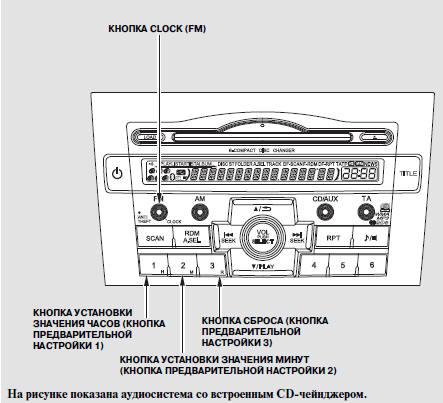
You can quickly round the clock time to the nearest hour. If the minutes shown on the display are less than 30, press and hold the CLOCK button until you hear a beep, then press the R button (preset button 3) to round the time down to the previous hour. If the minutes are greater than 30, the time will be rounded up to the next hour.
For example:
A time of 1:06 will be rounded to 1:00. A time of 01:53:00 will be rounded to 02:00:00.
Selecting the time format
You can select a 12-hour or 24-hour time format.
For vehicles equipped with a navigation system: The navigation system receives GPS time signals and automatically corrects the current time. For more information on manually correcting the time, refer to the navigation system owner's manual.
Test yourself
A quick Honda CR-V quiz: every answer comes with an explanation and a link to the manual page.