Feature Settings
Setting
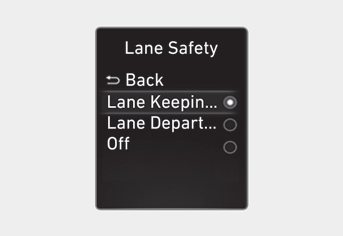
Lane Safety
Using the Engine Start/Stop button in the ON position, select or deselect "Driver Assist → Lane Safety" from the Settings menu to set whether each function is used.
-- If "Lane Keeping Assist" is selected, the function will automatically assist the driver's steering when a lane departure is detected, to help prevent the vehicle from leaving its lane.
-- If "Lane Departure Warning" is selected, the function will warn the driver with an audible warning and steering wheel vibration when a lane departure is detected. The driver must control the vehicle.
-- If "Off" is selected, the function is turned off. The indicator light will turn off on the instrument cluster.
WARNING
- If "Lane Departure Warning" is selected, steering assist is not provided.
- The Lane Keeping Assist system does not control the steering wheel when the vehicle is driving in the middle of the lane.
- The driver must always be aware of the surroundings and control the vehicle if "Off" is selected.
Turning the Function On/Off (Lane Safety Button)
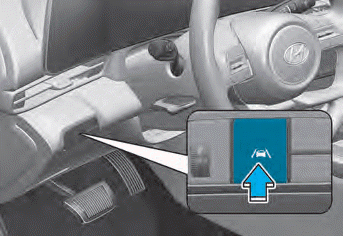
With the engine running, press and hold the Lane Safety button located on the instrument panel to turn on Lane Keeping Assist. The whiteindicator light will illuminate on the instrument cluster. Press the button again to turn the system off.
If the engine is restarted, Lane Keeping Assist will retain the last setting.
Information
When the Lane Keeping Assist system is turned off with the Lane Safety button, the Lane Safety settings will be turned off.
Turning the system on/off (Lane Keeping Assist button)
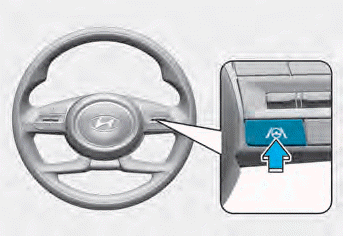
With the engine running, press and hold the Lane Keeping Assist button on the steering wheel to turn on the Lane Keeping Assist system. The white indicator light will illuminate on the instrument cluster.The white indicator light will illuminate on the instrument cluster.
Press the button again to turn off the system.
If the engine is restarted, Lane Keeping Assist will retain the last setting.
CAUTION
When the Lane Keeping Assist button is briefly pressed, the Lane Keeping Assist system will turn on or off.
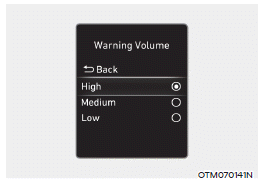
Warning Volume
With the engine running, select "Driver Assistance → Warning Volume" from the Settings menu to change the Warning Volume for Lane Keeping Assist to "High", "Medium" or "Low".
If you change the Warning Volume, the Warning Volume of other Driver Assistance systems may also be changed.
Test yourself
A quick Hyundai Elantra CN7 quiz: every answer comes with an explanation and a link to the manual page.