Steering Wheel Audio Controls
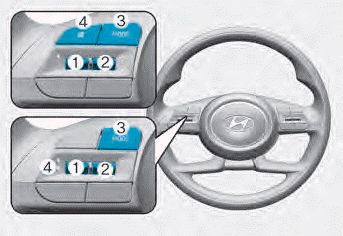
Audio system controls are installed on the steering wheel for your convenience.
NOTICE
Do not operate more than one remote audio control button at the same time.
VOLUME (VOLUME + / VOLUME -) (1)
- Push the VOLUME switch up to increase the volume.
- Push the VOLUME switch down to decrease the volume.
SEEK/PRESET ( ˄ / ˅ ) (2)
• RADIO mode
It operates as AUTO SEEK when the switch is pressed. It will search until you release the switch.
• MEDIA mode
It functions as the FF/REW switch. If the SEEK/PRESET switch is moved up or down, it will operate in the following modes.
• RADIO mode
It will function as a PRESET STATION. Up/Down switch.
• MEDIA mode
It will function as a TRACK UP/ DOWN switch.
MODE ( ) (3)
Press the MODE button to select Radio.
MUTE ( ) (4)
Information
Detailed information on audio button controls is described later in this chapter.
Infotainment System
If your vehicle is equipped with optional navigation, refer to the separately supplied infotainment system manual.
Test yourself
A quick Hyundai Elantra CN7 quiz: every answer comes with an explanation and a link to the manual page.