Smart Key

1. Door Lock
2. Door Unlock
3. Trunk Unlock
4. Panic
Your HYUNDAI uses a smart key, which you can use to lock or unlock the doors (and trunk) and even start the engine.
Locking

To lock:
1. Close all doors, the hood, and the trunk.
2. Either press the door handle button or press the door lock button (1) on the smart key.
3. The hazard warning lights will flash and the horn will sound once. The outside rearview mirrors will also fold if the outside rearview mirror folding switch is in the AUTO position.
4. Make sure the doors are locked by checking the door lock button inside the vehicle.
✽ NOTICE
The door handle button will only work when the smart key is within 28~40 in. (0.7~1 m) of the outside door handle.
Even if you press the outside door handle button, the doors will not lock and the horn will sound for three seconds if any of the following occurs:
- The smart key is inside the vehicle.
- The engine start/stop button is in the ACC or ON position.
- Any door other than the tailgate is open.
WARNING
Do not leave the smart key in the vehicle unattended with children. Unattended children could press the engine start/stop button and operate the power windows or other controls, or even cause the vehicle to move, which may result in serious injury or death.
Unlocking
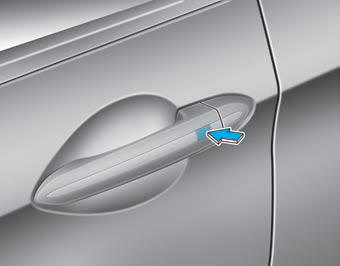
To unlock:
1. Carry the Smart Key.
2. Either press and hold the driver's outside door handle button or press the door unlock button (2) on the smart key.
3. The driver's door will unlock and the hazard warning lights will flash twice. The outside rearview mirrors will also unfold if the outside rearview mirror folding switch is in the AUTO position.
If you press the driver's outside door handle button or the door unlock button on the smart key again within four seconds, all doors will unlock.
✽ NOTICE
- The door handle button will only work when the smart key is within 28~40 in. (0.7~1 m) of the outside door handle, and other persons may also open the doors.
- If the front passenger's outside door handle button is pressed while carrying the smart key, all doors will unlock.
- After the doors are unlocked, they will automatically lock after 30 seconds if no door is opened.
- You can change the system to Central Door Unlock Mode (all doors unlock when the unlock button is pressed once). To change between the two-stage unlock mode and central door unlock mode, do the following: Press and hold the lock button and the unlock button on the smart key at the same time for 5 seconds or more. The hazard warning lights will flash four times.
Opening the Trunk
To open:
1. Carry the Smart Key.
2. Either press the trunk handle button or press and hold the trunk unlock button (3) on the smart key for more than one second.
3. The hazard warning lights will flash twice.
After the trunk is opened and then closed, the trunk will automatically lock.
✽ NOTICE
The trunk handle button will only work when the smart key is within 28 in. (0.7 m) of the trunk handle.
Panic button
Press and hold the panic button (4) for more than one second. The horn and hazard warning lights will flash for about 30 seconds. To cancel panic mode, press any button on the smart key.
Starting
You can start the engine without inserting the key.
CAUTION
To prevent damage to the smart key:
- Keep the smart key away from water or any liquid and fire. If the inside of the smart key becomes wet (from drinks or moisture) or overheated, the internal circuit may malfunction, which may void the vehicle warranty.
- Do not drop or throw the Smart Key.
- Protect the smart key from extreme temperatures.
Mechanical Key
If the smart key does not work normally, you can lock or unlock the door using the mechanical key.
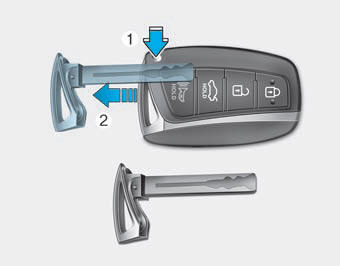
Press and hold the unlock button (1) and remove the mechanical key (2). Insert the mechanical key into the key hole in the door.
To reinstall the mechanical key, insert the key into the hole and push it in until a click is heard.
Lost Smart Key
A maximum of three smart keys, including card-type smart keys, can be registered to one vehicle. If you lose your smart key, it is recommended that you immediately take the vehicle and remaining keys to an authorized HYUNDAI dealer, or have the vehicle towed if necessary.
Test yourself
A quick Hyundai Genesis DH quiz: every answer comes with an explanation and a link to the manual page.