Heating, Ventilation, and Air Conditioning
Temperature Control Actuator Repair Procedures
In this manual: Heating, Ventilation, and Air Conditioning
17steps
~102min
4/5difficulty
Done 0 of 17
Inspection
- Turn the ignition off.
- Disconnect the temperature control actuator connector.
- Make sure the temperature control actuator operates to the warm (driver side) or cool (passenger side) position when 12 V is applied to terminal 3 and ground terminal 4. Make sure the temperature control actuator operates to the cool (driver side) or warm (passenger side) position when the connections are reversed.
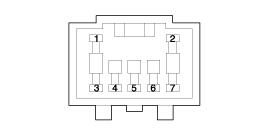
1. -
2. -
3. Warm Position
4. Cool Position5. Sensor (+5V)
6. Feedback Signal
7. Sensor Ground - Connect the temperature control actuator connector.
- Turn the ignition on.
- Check the voltage between terminals 6 and 7 (between terminals 5 and 6 on the passenger side). Specification
Door Position Voltage (V) Fault Detection Max. Cool 0,3±0,15 Low voltage: 0.1 V or less Max. Heat 4,7±0,15 High voltage: 4.9 V or more
It will report the current actuator position to the controls. - If the measured voltage does not meet the specification, replace the temperature control actuator with a genuine part and check the operation.
- Replace the temperature control actuator if it is determined to be faulty.
Replacement
[Driver Side]- Disconnect the negative (-) battery terminal.
- Remove the main crash pad. (Refer to Body - "Crash Pad")
- Disconnect the connector (A), then remove the driver side temperature control actuator (B) after loosening the mounting screws.
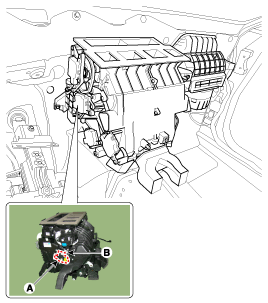
- Install in the reverse order of removal.
- Disconnect the negative (-) battery terminal.
- Remove the main lower airbag unit. (Refer to Body - "Main Lower Airbag Assembly")
- Remove the passenger side air vent duct (A) after loosening the screw.
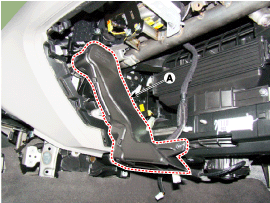
- Disconnect the connector (A), then remove the passenger side temperature control actuator (B) after loosening the mounting screws.
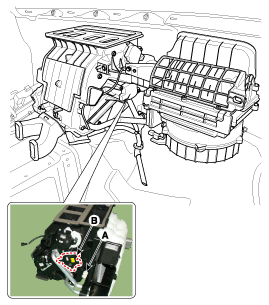
- Install in the reverse order of removal.
Test yourself
A quick Hyundai Genesis DH quiz: every answer comes with an explanation and a link to the manual page.
Was this page helpful?