Convenient Features of Your Vehicle
Odometer / Average Vehicle Speed / Timer
In this manual: Convenient Features of Your Vehicle
~1min read
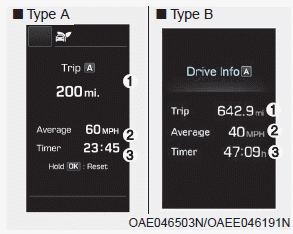
Odometer (1)
- The odometer is the total distance driven since the trip odometer was last reset.
- To reset the trip odometer reading, press and hold the OK button on the steering wheel for more than 1 second while the trip odometer is displayed.
Average Vehicle Speed (2)
- The average speed of the vehicle is calculated from the total distance traveled and the driving time since the average speed was last reset.
- To reset the average speed, press and hold the OK button on the steering wheel for more than 1 second while the average speed is displayed.
Information
- The average speed will not be displayed if the distance traveled is less than 0.19 mile (300 meters) or the driving time is less than 10 seconds after the average speed is reset.
- The average vehicle speed will continue to be calculated and will begin to decrease if the vehicle stops with the engine running (for example, when the vehicle is in traffic or stopped at a traffic light).
Timer (3)
- The timer shows the total driving time since the timer was last reset.
- To reset the timer, press and hold the OK button on the steering wheel for more than 1 second while the timer is displayed.
Information
The timer will continue to count while the engine is running (for example, when the vehicle is stuck in traffic or stopped at a traffic light).
Test yourself
A quick Hyundai Ioniq quiz: every answer comes with an explanation and a link to the manual page.
Was this page helpful?