Panic Button, Start, Mechanical Key
Panic button
Press and hold the panic button (5) for more than one second. The horn will sound and the emergency lights will flash for approximately 30 seconds. To cancel panic mode, press any button on the smart key.
Starting
You can start the vehicle without inserting the key.
NOTICE
To prevent damage to the Smart Key:
- Store the smart key in a cool, dry place to avoid damage or malfunction. Exposure to moisture or high temperature may cause the internal circuit of the smart key to malfunction, which may not be covered by the warranty.
- Do not drop or throw the Smart Key.
- Protect the smart key from extreme temperatures.
Mechanical Key
If the Smart Key does not work normally, you can lock or unlock the driver's door with the mechanical key.
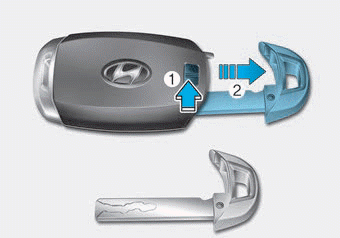
To remove the mechanical key from the smart key, slide the release lever in the direction of the arrow (1), then pull the mechanical key (2) out.
To unlock the vehicle with the mechanical key, insert the mechanical key into the keyhole in the driver door (see page 3-15).
To reinstall the mechanical key into the smart key, insert the key into the top of the smart key and press inward until a click is heard.
Test yourself
A quick Hyundai Palisade quiz: every answer comes with an explanation and a link to the manual page.