Unlocking the Vehicle
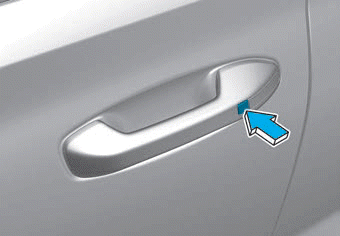
To unlock the vehicle:
1. Make sure you have the Smart Key with you.
2. Press either the button on the door handle or the door unlock button (2) on the Smart Key. The driver's door will unlock and the hazard warning lights will flash twice.
Two-Press Unlock Feature
Driver-only unlock or unlocking all doors with one press can be set in the User Settings mode on the cluster LCD.
When the Two-Press Unlock function is enabled, the user must press the door unlock button once to unlock only the driver's door and twice to unlock all doors.
Select or deselect the Two-Press Unlock function in the User Settings mode on the cluster LCD. The option can be found under the following menu:
User Settings ➞ Door ➞ Two-Press Unlock
The two-press unlock function can also be enabled or disabled by pressing and holding the door lock and unlock buttons on the key fob simultaneously:
Press and hold both the door lock button and the door unlock button at the same time until the hazard warning lights flash.
This will enable or disable the Two-Press Unlock function. Repeat this procedure to switch the mode again.
Information
- The door handle buttons will only work when the smart key is within 28-40 in. (0.7~1 m) of the outside door handle.
- Either the driver or front passenger door can be opened using the door handle button when the smart key is within this range.
- If the front passenger outside door handle is pressed while the smart key is in your possession, all doors will unlock.
Test yourself
A quick Hyundai Palisade quiz: every answer comes with an explanation and a link to the manual page.