Multimedia System
Answering Calls
In this manual: Multimedia System
~1min read
Answering a Call
When answering a call with a connected Bluetooth® Wireless Technology device, the following screen is displayed.
To answer a call, press the key on the steering wheel during an incoming call.
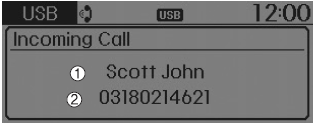
1) Caller: Displays the name of the other party if the incoming caller is saved in your contacts.
2) Incoming number: Displays the incoming number.
✽ NOTICE
- When the incoming call pop-up is displayed, most Audio and SETUP functions are disabled. Only the call volume will work.
- The phone number may be displayed incorrectly on some mobile phones.
- When a call is answered on the mobile phone, the call mode automatically returns to private mode.
Favorites
press key
 Select [Favorites]
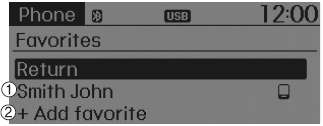
1) Saved favorite contact: Connects a call after selection
2) To add to favorites: Downloaded contacts will be saved as favorites.
✽ NOTICE
- To save favorites, contacts must be downloaded.
- A contact saved in Favorites will not be updated automatically if the contact is updated on the phone. To update the favorite, delete the favorite and create a new one.
Test yourself
A quick Hyundai Tucson LM quiz: every answer comes with an explanation and a link to the manual page.
Was this page helpful?