Multimedia System
Phone Menu Screen
In this manual: Multimedia System
~1min read
Phone Menu
With a Bluetooth® Wireless Technology device connected, press the button to display the phone menu screen.
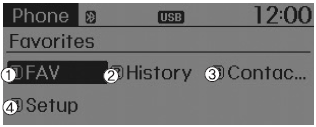
1) Favorites: Up to 20 frequently used contacts saved for quick access
2) Call History: Displays the call history list screen.
3) Contacts: Displays the contacts list.
4) Settings: Displays phone-related settings.
✽ NOTICE
- If you select the [Call History] button but no call history data exists, a prompt to download call history data is displayed.
- If you press the [Contacts] button but no contact data is stored, a prompt requesting download of contact data is displayed.
- This function may not be supported on some mobile phones. For details on download support, refer to the owner's manual of your mobile phone.
Test yourself
A quick Hyundai Tucson LM quiz: every answer comes with an explanation and a link to the manual page.
Was this page helpful?