Multimedia System
Clock/Calendar Settings
In this manual: Multimedia System
~1min read
Clock Settings
press key
 Select [Clock/Calendar].
 Select [Clock Settings].
Use ,
 buttons to set the hour, minute and AM/PM setting.
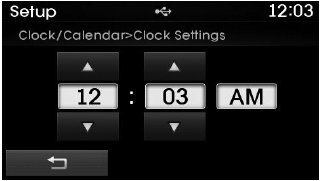
✽ NOTICE
Press and hold the  key (more than 0.8 seconds) to set the clock/calendar screen.
Calendar Settings
press key
 Select [Clock/Calendar].
 Select [Calendar Settings].
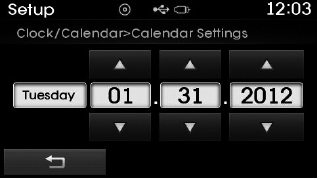
Use ,
 buttons to set the month, day and year.
Time Format
press key
 Select [Clock/Calendar].
 Select [Time Format]
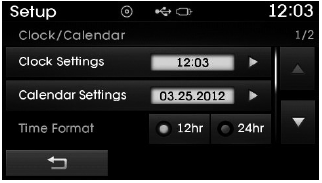
This function is used to change the clock format from 12-hour to 24-hour.
Clock Display
press key
 Select [Clock/Calendar].
 Select [Clock Display (Power Off)].
This function is used to display the clock on the screen when the audio system is off.
Test yourself
A quick Hyundai Tucson LM quiz: every answer comes with an explanation and a link to the manual page.
Was this page helpful?