System Settings
Real-Time Feedback
press key
 Select [System].
 Select [Real-Time Feedback]

This function is used to select the desired operation feedback option from On and Off.
1) On: Detailed prompts are displayed when using voice recognition.
2) Off: Some prompts are skipped when using voice recognition.
Language
press key
 Select [System].
 Select language].
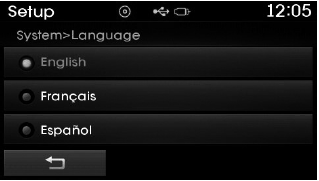
This function is used to change the voice recognition system and language.
If the language is changed, the system will restart and apply the selected language.
Memory Information
press key
 Select [System].
 Select [Memory Information]

This function displays information related to the system memory.
1) Used: Displays the capacity currently in use.
2) Capacity: Displays the total capacity.
Test yourself
A quick Hyundai Tucson LM quiz: every answer comes with an explanation and a link to the manual page.