Clock Settings
press key
 Select [Clock] using the
 the TUNE knob or
 key
 Select the menu using the
 SETUP knob
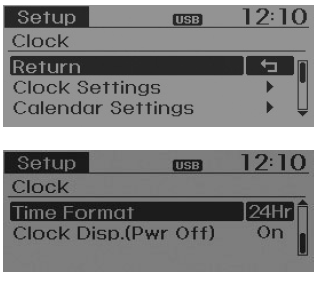
Clock Settings
This menu is used to set the time. Select [Clock Settings] Set using the
 SETUP knob
 Press
 SETUP knob
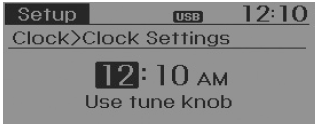
❈ Adjust the number currently in focus to set the [Hour], then press the TUNE knob to set the [Minutes].
Calendar Settings
This menu is used to set the date. Select [Calendar Settings] Set using the
 SETUP knob
 Press
 SETUP knob
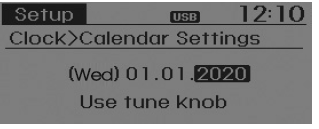
❈ Adjust the number currently in focus to make the settings, then press the knob to move to the next item. (Set in the order of Year/Month/Day)
Time Format
This feature is used to set the audio system time format to 12-hour or 24-hour.
Select [Time Format] Set to 12 hours / 24 hours using the
 SETUP knob
Clock Display with Power Off
Select [Clock Display (Power Off)] SETUP
 /
 using the
 SETUP knob
 : Displays the time/date on the screen
- •
 Off: Turns off the display.
Test yourself
A quick Hyundai Tucson LM quiz: every answer comes with an explanation and a link to the manual page.