Compass Function
The compass can be turned on and off, and it remembers the last state when the ignition is cycled. To turn the display function on or off:
1. Press and release the Press the button to turn off the display.
2. Press and release the Press the button again to turn the display back on.
Additional settings can be made by pressing and holding the button in sequence, as described in detail below.
There is a difference between magnetic north and true north. To compensate for this difference, you will need to adjust the zone setting according to where you live.
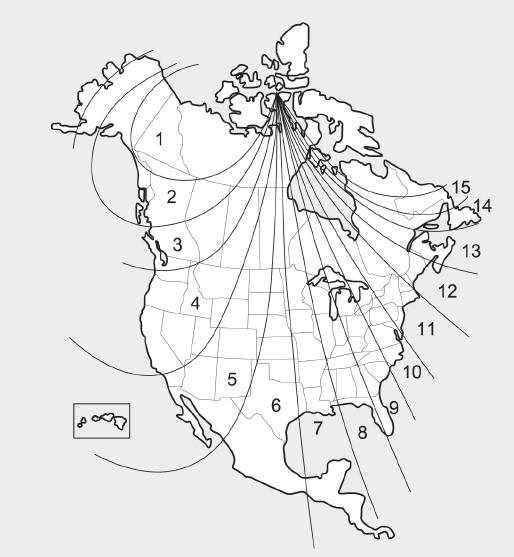
To adjust the zone setting:
1. Determine the desired zone number based on your current location on the Zone Map.
2. Press and hold the button for more than 3 but less than 6 seconds. The current Zone Number will appear on the display.
3. Press and hold the button repeatedly to increase the numbers. (Note: they will cycle through … 13, 14, 15, 1, 2, …). Release the button when the desired Zone Number appears on the display to set the new zone.
4. After approximately 5 seconds, the compass will again begin displaying the compass direction.
Certain conditions can change the vehicle's magnetic field, for example, installing a ski rack or CB antenna. Body repair work on the vehicle can also cause changes in the magnetic field. In these cases, the compass will need to be recalibrated to quickly correct these changes.
If you need to recalibrate the compass:
1. Press and hold the Press and hold the button for more than 6 seconds. When the compass memory is cleared, the letter "C" will appear on the display.
2. Drive the vehicle in 2 complete circles at a speed of less than 8 km/h.
Integrated HomeLink® Wireless Control System
The HomeLink® Wireless Control System can replace up to three portable radio frequency (RF) transmitters with a single built-in device. This innovative feature learns the RF codes of most current transmitters to operate devices such as gate operators, garage door openers, entry door locks, security systems, and even home lighting. Both standard and rolling code transmitters can be programmed by following the described procedures.
For more information about HomeLink®, visit www.homelink.com or call 1-800-355-3515.
Keep the original transmitter of the radio frequency device you are programming for use in other vehicles, as well as for future HomeLink® programming. It is also recommended that the programmed HomeLink® buttons be erased when the vehicle is sold, for security reasons.
WARNING
Before programming HomeLink® to operate a garage door or gate operator, make sure that people and objects are clear of the device to prevent potential injury or damage. Do not use HomeLink® with a garage door opener that lacks the safety stop and reverse features required by U.S. federal safety standards (this includes any garage door opener model manufactured before April 1, 1982). A garage door that cannot detect an object and signal the door to stop and reverse does not meet current U.S. federal safety standards. Using a garage door opener without these features increases the risk of serious injury or death.
Programming HomeLink®
Note the following:
- When programming a garage door opener, it is recommended that you park the vehicle outside the garage.
- It is recommended that you install a new battery in the hand-held transmitter being programmed to HomeLink® for faster training and accurate transmission of the radio frequency signal.
- On some vehicles, the ignition switch may need to be placed in ACC (or "Accessory") to program and/or operate HomeLink®.
- If you still have difficulty programming or have questions after performing the programming steps listed below, contact HomeLink® at www.homelink.com or call 1-800-355-3515.
Test yourself
A quick Hyundai Tucson LM quiz: every answer comes with an explanation and a link to the manual page.