Intelligent Speed Limit Assist Operation
Intelligent Speed Limit Assist can warn you and control your vehicle by "Displaying the Speed Limit", "Speeding Warning" and "Changing the Set Speed".
Information
Intelligent Speed Limit Assist is described based on the speed limit offset adjusted to "0". For more information on setting the offset, see "Speed Limit Offset" in this section.
Speed Limit Display
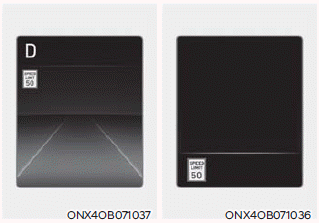
Speed limit information is displayed on the instrument cluster.
- If speed limit information for the road cannot be recognized, "---" is displayed.
- Intelligent Speed Limit Assist provides additional road sign information in addition to speed limit information. The additional road sign information provided may vary depending on your country.
- Images and colors on the instrument cluster may differ depending on the cluster type or the theme selected in the settings menu.
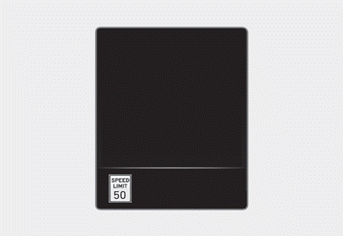
When driving faster than the displayed speed limit, the speed limit is displayed in red.
Changing the Set Speed
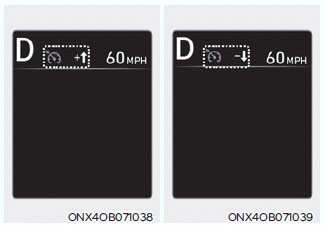
If the speed limit changes while using Manual Speed Limit Assist or Smart Cruise Control, an up or down arrow appears to prompt you to change the set speed by pressing the + or – switch.
WARNING
- If you want to drive below the speed limit, set the speed limit offset to "0" or use the – switch on the steering wheel to reduce the set speed. If the Speed Limit Offset is set to "0", the set speed cannot be changed to a speed higher than the road speed limit.
- Reduce driving speed as necessary. Even after changing the set speed according to the road speed limit, your vehicle may still be driving over the speed limit.
- If the road speed limit is below 30 km/h, the set speed change function does not operate.
- Intelligent Speed Limit Assist operates using the speed unit you set in the Settings menu. If you set a speed unit different from the speed unit used in your country, Intelligent Speed Limit Assist may not operate correctly.
Information
- For more information on how the Manual Speed Limit Assist operates, see "Manual Speed Limiter (MSLA)" in this chapter.
- For more detailed information on Smart Cruise Control operation, see "Smart Cruise Control (SCC)" in this chapter.
Test yourself
A quick Hyundai Tucson LM quiz: every answer comes with an explanation and a link to the manual page.