Intelligent Speed Limit Assist Settings
Speed Limit
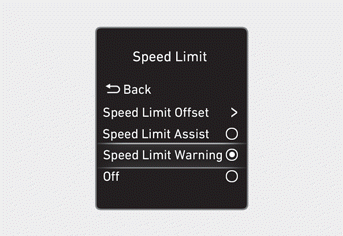
With the ignition ON, go to User Settings > Driver Assistance > Speed Limit (for cluster type) or Setup > Vehicle > Driver Assistance > Speed Limit (for infotainment system type) from the Settings menu to select the following:
- If Speed Limit Assist is selected, Intelligent Speed Limit Assist informs you of speed limits and additional road signs. The function prompts you to change the set speed of the Manual Speed Limit Assist or Smart Cruise Control, if necessary.
- If Speed Limit Warning is selected, Intelligent Speed Limit Assist informs you of speed limits and additional road signs. The function warns you when your vehicle is driving faster than the speed limit, but does not adjust the set speed of the Manual Speed Limit Assist or Smart Cruise Control.
- If "Off" is selected, Intelligent Speed Limit Assist is turned off.
Speed Limit Offset
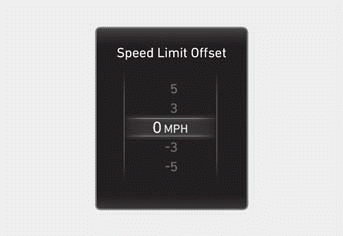
With the ignition ON, when User Settings > Driver Assistance > Speed Limit > Speed Limit Offset (for cluster type) or Setup > Vehicle > Driver Assistance > Speed Limit Offset (for infotainment system type) is selected, the speed limit offset can be changed. Speed Limit Warning and Speed Limit Assist operate by applying the speed limit offset setting to the detected speed limit.
Information
- If you want to set the speed according to the road speed limit, adjust the offset to "0". The Speed Limit Assist and Speed Limit Warning functions operate based on the speed limit offset parameter added to the speed limit.
- Navigation-based Smart Cruise Control depends on the speed limit for the road and is not affected by the Speed Limit Offset function.
WARNING
Change the settings only after parking your vehicle in a safe place.
Test yourself
A quick Hyundai Tucson LM quiz: every answer comes with an explanation and a link to the manual page.