Lane Keeping Assist System Operation
Turning Lane Keeping Assist On/Off
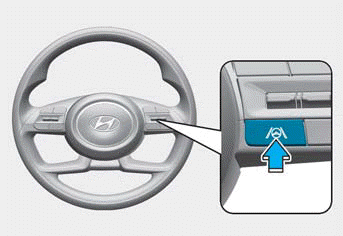
With the ignition ON, press and hold the Lane Keeping Assist button located on the steering wheel to turn the function on and off. The white or green indicator light illuminates on the instrument cluster when the function is on.
Press and hold the button again to turn the function on.
Information
- When the engine is restarted, Lane Keeping Assist retains its last setting.
- When Lane Keeping Assist is turned off by pressing the Lane Driving Assist button, the Lane Safety setting changes to Off.
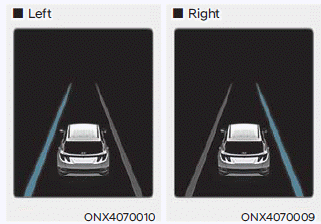
If the vehicle detects that it is drifting out of the intended lane ahead, the greenindicator light and lane line on the instrument cluster flash depending on the direction the vehicle is moving, and an audible warning sounds.
Lane Keeping Assist operates when the vehicle speed is approximately 40-120 mph (60-200 km/h).
Lane Keeping System
If the vehicle detects that it is drifting out of the projected lane ahead, the greenindicator flashes on the instrument panel and the steering wheel makes corrections to keep the vehicle within its lane.
- Lane Keeping Assist operates when the vehicle speed is approximately 40-120 mph (60-200 km/h).
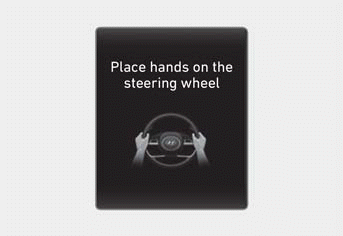
If you remove your hands from the steering wheel for several seconds, the "Place Hands on Steering Wheel" warning message may appear on the instrument cluster, and an audible warning may sound in successive stages.
WARNING
Lane Keeping Assist may not operate in all situations and cannot avoid all collisions.
To avoid serious injury or death:
- Always drive your vehicle attentively. Lane Keeping Assist is not an autonomous driving system and does not control your vehicle at all times.
- Lane Keeping Assist may not control the steering if the steering wheel is held too tightly, or the steering wheel is turned too far to the left or right.
- If the steering wheel is held very loosely, a hands-off warning message may appear because Lane Keeping Assist may not detect that you have your hands on the steering wheel.
- The hands-off warning message may appear late or not at all depending on road conditions.
- If you attach objects to the steering wheel, the hands-off warning may not function properly.
Information
- The operating status of Lane Keeping Assist is shown in the driving assist mode display on the instrument cluster. Refer to "Display Modes" in Chapter 4.
- When lane markings (or road edges) are detected, the lane lines on the instrument cluster change from gray to white. When Lane Keeping Assist is turned on, green The indicator light illuminates.
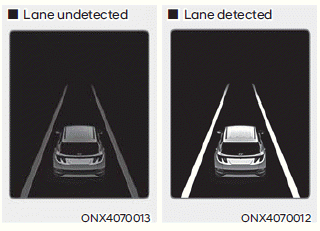
- Images and colors on the instrument cluster may differ depending on the cluster type or the theme selected in the settings menu.
- You can override the steering assistance provided by Lane Keeping Assist and steer the vehicle.
- More or less force may be required to steer when Lane Keeping Assist is providing steering assistance.
Test yourself
A quick Hyundai Tucson LM quiz: every answer comes with an explanation and a link to the manual page.