Driver Assistance System
Lane Keeping Assist System Settings
In this manual: Driver Assistance System
~1min read
Lane Safety
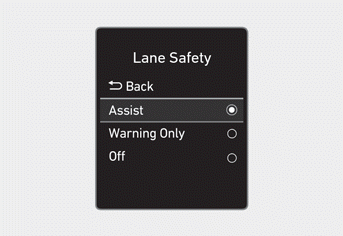
With the ignition ON, go to User Settings > Driver Assistance > Lane Safety (for cluster type) or Setting > Vehicle > Driver Assistance > Lane Safety (for infotainment system type) in the settings menu to select the following:
- If Assist is selected, Lane Keeping Assist sounds an audible alert and assists with steering to help prevent your vehicle from leaving its lane.
- If Warning Only is selected, Lane Keeping Assist sounds an audible alert. The function does NOT steer your vehicle if a lane departure is detected.
- If Off is selected, the Lane Keeping Assist system turns off.
 the indicator turns off on the instrument cluster.
WARNING
- If Warning Only or Off is selected, Lane Keeping Assist does not steer if a lane departure is detected.
- Lane Keeping Assist does not assist with steering when you are driving near the center of the lane.
Information
You can change the warning volume setting or select Driving Safety Priority for Lane Keeping Assist in the settings menu. For more information, refer to the "Driver Assistance System Settings" section in this chapter.
Test yourself
A quick Hyundai Tucson LM quiz: every answer comes with an explanation and a link to the manual page.
Was this page helpful?