Pairing a Bluetooth® Wireless Technology Device
What is Bluetooth® Wireless Technology pairing?
Pairing is the process of synchronizing your Bluetooth® Wireless Technology phone or device with the vehicle audio system for connection.
Pairing is required to connect and use the Bluetooth® Wireless Technology function.
Pairing Key /
 Steering wheel remote control key
When no device has been paired
1. Press the key or
 steering wheel remote control key. The following screen is displayed.
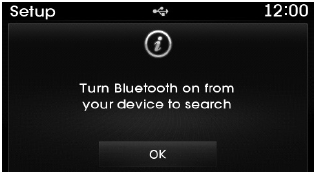
2. Press the button to enter the phone pairing screen.
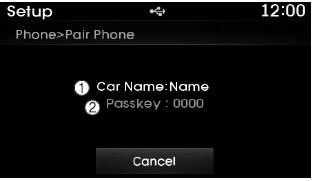
1) Vehicle name: The device name displayed when searching with the Bluetooth® Wireless Technology device.
2) Passkey: The password used to pair the device.
3. On the Bluetooth® Wireless Technology device (e.g., mobile phone), search for and select the vehicle audio system.
✽ NOTICE
- The Bluetooth® Wireless Technology functions supported in the vehicle are as follows. Some functions may not be supported depending on your Bluetooth® Wireless Technology device. Outgoing/incoming hands-free calls; operations during a call (Switch to private, Switch to call waiting, mute/unmute microphone); call history download; mobile phone contacts download; Bluetooth® Wireless Technology device auto connection; Bluetooth audio streaming.
- Up to five Bluetooth® Wireless Technology devices can be connected to the vehicle hands-free system.
- Only one Bluetooth® Wireless Technology device can be connected at a time.
- Other devices cannot be paired while a Bluetooth® Wireless Technology device is connected.
- Only Bluetooth® Wireless Technology Handsfree and Bluetooth Audio functions are supported.
- Normal operation is only possible on devices that support Handsfree or audio functions, such as a Bluetooth® Wireless Technology mobile phone or a Bluetooth audio device.
- If a connected Bluetooth® Wireless Technology device is disconnected due to being out of communication range, the device being turned off, or Bluetooth® being disabled, the system automatically searches for and connects to the corresponding Bluetooth® Wireless Technology device.
- If the system becomes unstable due to communication errors between the car hands-free unit and the Bluetooth® Wireless Technology device, reset the Bluetooth® Wireless Technology settings and try again. After resetting the Bluetooth® Wireless Technology settings, the system is restored to its factory default state.
- After pairing is completed, a request to download contacts is sent to the mobile phone once. Since some mobile phones may require confirmation when receiving the download request, check the screen of the mobile phone.
Test yourself
A quick Hyundai Tucson LM quiz: every answer comes with an explanation and a link to the manual page.