Multimedia System
Deleting a Device
In this manual: Multimedia System
~1min read
press key
 Select [Phone]
 Select [Paired Phone List]
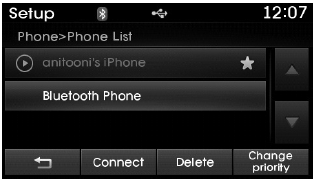
In the paired phone list, select the device you want to delete, and press the button.
✽ NOTICE
- If the currently connected device is deleted, it will automatically disconnect before the deletion process continues.
- If a paired Bluetooth® Wireless Technology device is deleted, its call history and contact data will also be deleted.
- To use a deleted device again, it must be paired again.
Test yourself
A quick Hyundai Tucson LM quiz: every answer comes with an explanation and a link to the manual page.
Was this page helpful?