Around View Monitor Operation
Parking/View Button
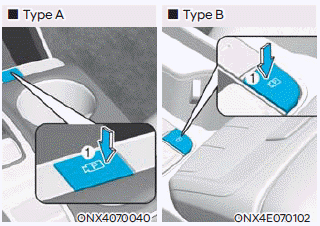
Press the Parking/View button 1 to turn on the Surround View Monitor.
Press the button again to turn off the feature.
Front View
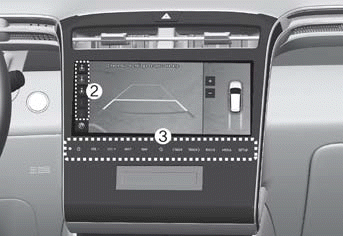
The front view appears on the screen when the shift lever is in N (Neutral) or D (Drive) for parking assistance. The front view includes the top view, front view, and side view.
View modes can be selected by pressing the view buttons 2 on the Surround View Monitor screen.
The system turns on when:
- You shift from R (Reverse) to N (Neutral) or D (Drive), and your vehicle speed is below 9 mph (15 km/h).
- You press the Parking/View button 1 when the shift lever is in N (Neutral) or D (Drive) and your vehicle speed is below 15 km/h.
- The Parking Distance Warning sounds while driving in D (Drive). (Surround View Monitor Auto On must be selected in the settings menu.)
Information
When the front view is turned on, the last selected view mode appears.
The system turns off when:
- You press the Parking/View button 1 or the Infotainment system button 3.
- Your vehicle speed exceeds 9 mph (15 km/h).
- You shift the shift lever to P (Park).
Information
The Surround View Monitor turns off if your vehicle speed exceeds 9 mph (15 km/h). Even if you decelerate to less than 15 km/h again, the Surround View Monitor does not turn on again.
Rear View
The rear view appears on the screen when the shift lever is in R (Reverse) or P (Park) for parking assistance. The rear view includes the top view, rear view, and side view. View modes can be selected by pressing the view buttons 2 on the Surround View Monitor screen.
The system turns on when:
- You shift the transmission into R (Reverse).
- You press the Parking/View button 1 when the shift lever is in P (Park).
The system turns off when:
- You press the Parking/View button 1 again when the shift lever is in P (Park).
- You shift the shift lever from R (Reverse) to P (Park).
Information
The rear view cannot be turned off when the shift lever is in R (Reverse), even if the Infotainment system buttons are pressed.
Test yourself
A quick Hyundai Tucson LM quiz: every answer comes with an explanation and a link to the manual page.