MULTIMEDIA
Remote Commands
In this manual: MULTIMEDIA
5steps
~30min
2/5difficulty
Done 0 of 5
The Remote Commands screen gives you access to several vehicle functions that can be operated remotely from your mobile device. These functions include locking/unlocking, remote start, and activating the vehicle horn and lights.
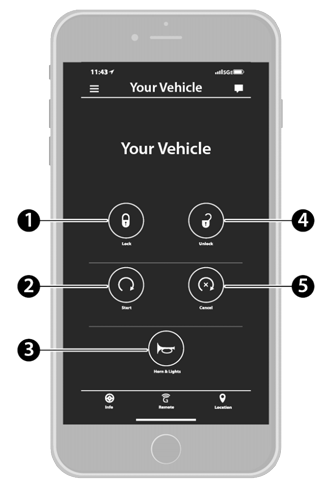
Remote Commands
- Lock: Press this button to lock the vehicle.
- Remote Start: Press this button to start the vehicle.
- Horn & Lights: Press this button to sound the horn and activate the lights.
- Unlock: Press this button to unlock the vehicle.
- Cancel Remote Start: Press this button to cancel remote start.
Remote Commands allow you to send a request to your vehicle in one of three ways:
- Anywhere using your mobile device and the Uconnect App
- From Your Computer on the Owner's Website (not available for all functions)
- Contacting SiriusXM Guardian™ Customer Care (not available for all functions)
Test yourself
A quick Jeep Wrangler quiz: every answer comes with an explanation and a link to the manual page.
Was this page helpful?