How It Works
- Use the Uconnect app to find a destination.
There are several ways to find a destination. After selecting the Location tab at the bottom of the app, tap the search field to view one of the categories shown, or enter a name or keyword in the search field at the top of the app. You can also select categories such as Favorites or Contact List.
- Select a destination from the list that appears. Location information will be displayed on the map.
On this screen you can:
- View the location on the map.
- View the distance from your current location.
- Send the address by selecting "Send to Car" from the mobile app.
- Send the destination to Uconnect Navigation in your vehicle. You can also call the destination by pressing the call button.
- Confirm the destination inside your vehicle by pressing the "Send to Car" button on the pop-up that appears on the radio touchscreen.
Requirements
The vehicle must be properly equipped with the Uconnect system and either Uconnect 4C or a detached 4C NAV unit.
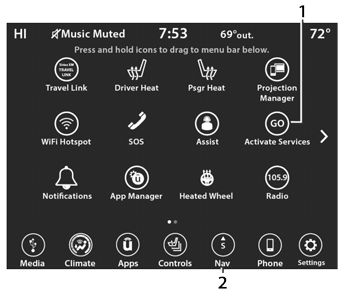
Uconnect 4C/4C NAV Connected Service Indicators
Activate Services (Connected Services)
Navigation Button
The vehicle must have a working LTE (voice/data) or 3G or 4G (data) network connection compatible with your device.
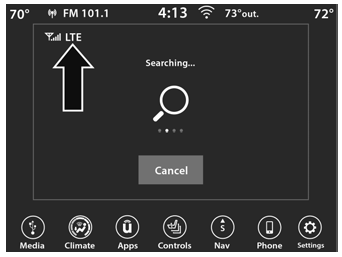
LTE Network Connection
- The vehicle must be registered with SiriusXM Guardian™ and have an active subscription that includes the applicable function.
Test yourself
A quick Jeep Wrangler quiz: every answer comes with an explanation and a link to the manual page.