MULTIMEDIA
Vehicle Locate
In this manual: MULTIMEDIA
4steps
~24min
2/5difficulty
Done 0 of 4
Description
The Vehicle Locate feature in the Uconnect app allows you to find the location of your parked vehicle.
You can also sound the horn and flash the lights to make locating your vehicle even easier.
How It Works
Use the Uconnect app to find the location of your vehicle.
- Select the Location tab at the bottom of the app. Then tap the vehicle icon to locate your vehicle.
- Select how you want to view the information by pressing the layers button. The following options will appear:
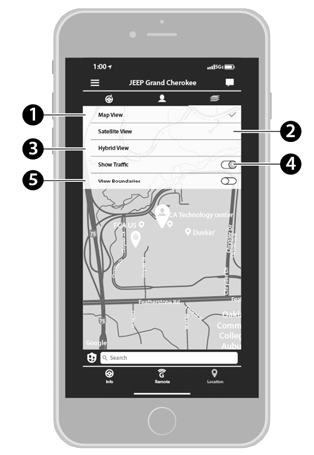
Vehicle Locate Layers
- Map View
- Satellite View
- Hybrid View
- Show Traffic
- View Boundaries
- You can also select the Person icon to view your location.
- Once the vehicle has been located, you can get directions to your vehicle.
NOTE:
- You are responsible for using the remote horn and lights service in accordance with the laws, regulations, and ordinances in effect at your vehicle's location.
- Some SiriusXM Guardian™ services depend on a properly installed and operating Uconnect system, cellular network availability compatible with the device in the vehicle, and GPS network availability. Not all SiriusXM Guardian™ features are available everywhere at all times, especially in remote areas or enclosed structures.
Requirements
- Vehicle Locate will not work while the vehicle is in motion.
- The vehicle must be properly equipped with the Uconnect system.
- The vehicle must have a working LTE (voice/data) or 3G or 4G (data) network connection compatible with your device.
- The vehicle must be registered with SiriusXM Guardian™ and have an active subscription that includes the applicable function.
- The vehicle ignition must be turned on within 14 days.
Test yourself
A quick Jeep Wrangler quiz: every answer comes with an explanation and a link to the manual page.
Was this page helpful?