Vehicle Specifications
List Menu
In this manual: Vehicle Specifications
~1min read
On the list screen, you can delete files that you have previously saved to My Music.
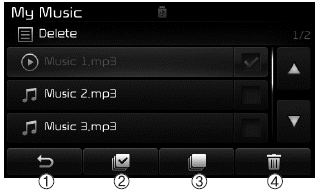
press button, or individually select the files you want to delete. After the files are selected,
 button and
 buttons will be enabled.
(1)  : Go to the previous screen
(2) Select All: Selects all files
(3) Unselect All: Cancels the selection of all selected files.
(4) Delete: Deletes the selected files.
After selecting the files you want to delete, press thebutton to delete the selected files.
✽ NOTICE
- If there is free memory, up to 6000 files can be saved.
- Identical files cannot be copied more than 1000 times.
- To check the memory information, go to [System] [Memory Information]
Test yourself
A quick Kia Cee'd quiz: every answer comes with an explanation and a link to the manual page.
Was this page helpful?