Mode Selection
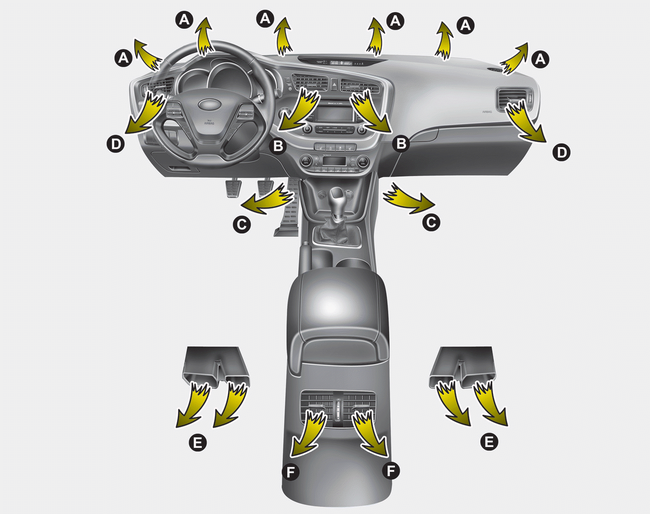
The mode selection button controls the direction of airflow into the vehicle. Press the button once to turn on the corresponding mode, and press it again to turn it off.
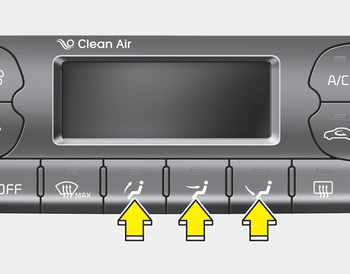
Face Level (B, D, F*)

Airflow is directed to the upper body and face. In addition, each vent can be adjusted to direct the discharged air away from the vent.
Floor Level (A, C, D, E)

Most of the airflow is directed to the floor.
Defrost Level (A, D)

Most of the airflow is directed to the windshield.
You can also select 2 to 3 modes at the same time.
- Face ( ) + floor (
 ) mode
- Face () + defrost ( ) mode
- Floor () + defrost () mode
- Face () + floor () + Defrost () mode
Maximum (MAX) Defrost Mode
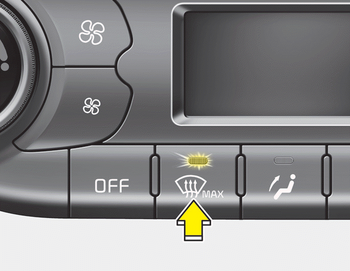
When you select MAX defrost mode, the following system settings are automatically activated:
- The air conditioning system will be turned on.
- The outside (fresh) air position will be selected.
- The fan speed will be set to maximum.
To turn off MAX defrost mode, press the mode button or the MAX defrost button again, or press the AUTO button.
Instrument Panel Vents
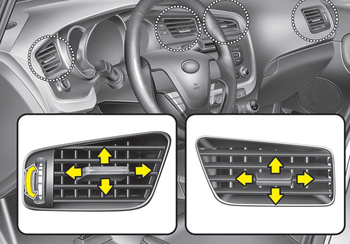
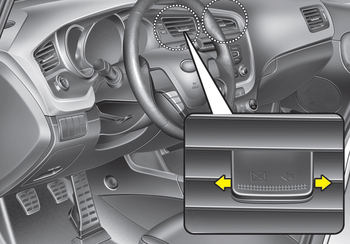
The outlet vents can be opened or closed individually using the adjusting ring or the vent control lever.
You can also adjust the direction of airflow from these vents using the vent control lever, as shown in the illustration.
Test yourself
A quick Kia Cee'd quiz: every answer comes with an explanation and a link to the manual page.