Remote Touch Screen
The Remote Touch screen in the Lexus GS L10 (2016–2020) allows intuitive control of many vehicle functions. This chapter describes operation of the 8- or 12.3-inch display, menu navigation and use in split-screen mode. Important notes cover safe handling, cleaning and protection against damage. This keeps the system functional and convenient even with frequent use.
Remote Touch/12.3-inch Display
Use the Remote Touch to operate the Remote Touch screens.
If your vehicle is equipped with a navigation system, refer to the "NAVIGATION AND MULTIMEDIA SYSTEM OWNER'S MANUAL".
The illustration below applies to left-hand drive vehicles.
Button locations may differ slightly on right-hand drive vehicles.
Operating the Remote Touch
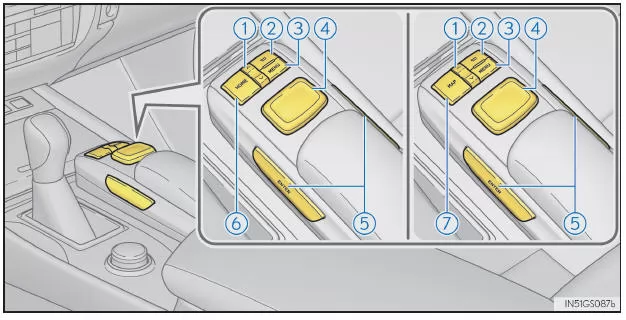
- "∧-∨" button.
Press this button to change the map scale or scroll through lists.
- "Back" button.
Press this button to display the previous screen.
- "MENU" button.
Press this button to display the "Menu" screen.
- Remote Touch knob.
Move the knob in the desired direction to select a function, letter or screen button.
Press the knob to enter the selected function, letter or screen button.
- "ENTER" button.
Press this button to enter the selected function, letter or screen button.
- "HOME" button (vehicles with 8-inch display).
Press this button to display the home screen.
- "MAP" button (vehicles with 12.3-inch display).
Press this button to display the vehicle's current position.
■ Using the Remote Touch knob

- Select: Move the knob in the desired direction.
- Enter: Press the knob or the "ENTER" button.
■ Screen response at low temperatures
At very low outside temperatures, the screen may respond slowly even when the Remote Touch is operated.
WARNING
■ When using the Remote Touch
- Be careful not to pinch your fingers, fingernails or hair in the Remote Touch, as this may cause injury.
- Use caution when operating the Remote Touch in extreme temperatures, as it may become very hot or cold depending on the temperature inside the vehicle.
■ How to avoid damaging the Remote Touch
- Do not allow food, drinks or stickers to come into contact with the Remote Touch, as this may cause discoloration, an unusual odor or malfunction.
- Do not subject the Remote Touch to excessive pressure or strong impacts, as the knob may bend or break off.
- Make sure no coins, contact lenses or similar objects get caught in the Remote Touch, as this may cause malfunction.
- Parts of clothing may tear if caught by the Remote Touch knob.
- If your hand or an object is on the Remote Touch knob when the engine switch is changed to ACCESSORY mode, the knob may not function properly.
"Menu" Screen
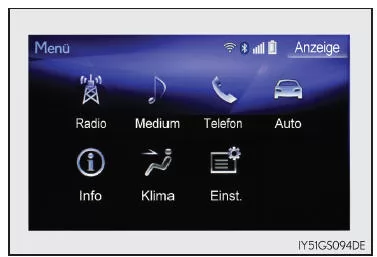
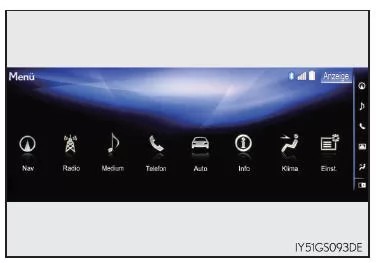
Press the "MENU" button on the Remote Touch to display the "Menu" screen.
The display may vary depending on the system type.
12.3-inch display: If an interruption screen is shown on the side display, the "Menu" screen is shown on the main display.
Vehicles with 8-inch display
Vehicles with 12.3-inch display
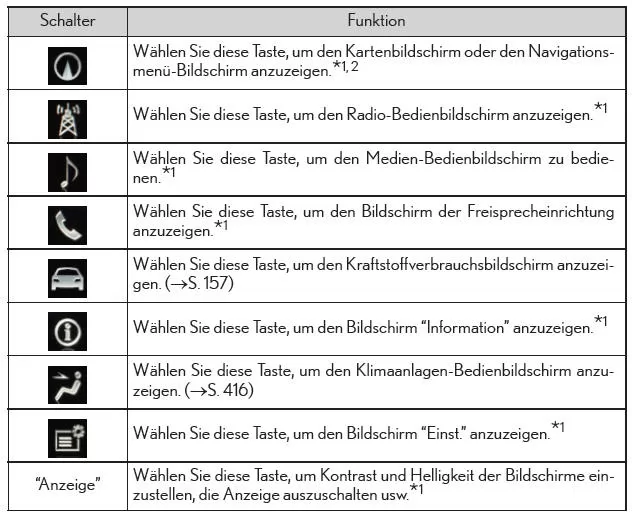
*1: Refer to the "NAVIGATION AND MULTIMEDIA SYSTEM OWNER'S MANUAL".
*2: If equipped
Operating the 12.3-inch Display
■ Full-screen display
The following functions can be displayed in full-screen mode:
- Home screen*
- "Menu" Screen
- Map screen*
- Audio screen*
- Fuel consumption screen
- Climate control screen
*: Refer to the "NAVIGATION AND MULTIMEDIA SYSTEM OWNER'S MANUAL".
■ Split screen
Different information can be displayed on the left and right sides of the display. For example, the climate control screen can be displayed and operated on one side while fuel consumption data is shown on the other side. The large screen on the left side of the display is called the main display, and the small screen on the right side is called the side display.
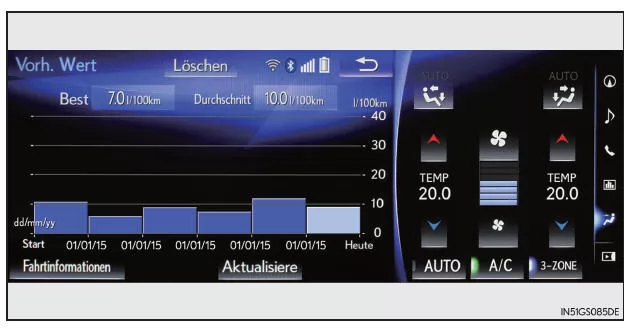
Functions of the 12.3-inch Display
For details on the functions and operation of the main display, see the relevant section.
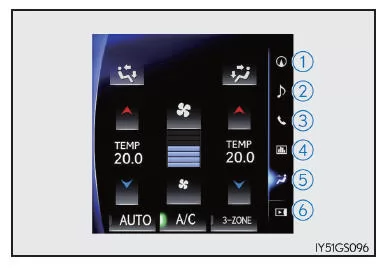
■ Displays on the side display
- Basic screens
The following functions can be displayed and operated on the side display.
Select the desired button.
- Navigation System*
- Audio*
- Phone*
- Vehicle Information
- Air conditioning
- Hide side display.*
If the function shown on the main display can be shown in full-screen mode, it is shown in full-screen mode.
- Interrupt Screens
Each of the following screens is displayed automatically according to the respective conditions.
Lexus parking assist sensor* (if equipped) Phone* Drive mode*: Refer to the "NAVIGATION AND MULTIMEDIA SYSTEM OWNER'S MANUAL".
The Remote Touch system in the Lexus GS GRL1 (4th generation) provides intuitive control of navigation, audio and vehicle settings. The ergonomic arrangement of the controls and the clear display on the screen ensure maximum operating convenience. In particular, the 12.3-inch display impresses with its functionality and clarity.
The Lexus GS 2016–2020 once again demonstrates how modern technology and user-friendliness combine into a harmonious whole. This sports sedan thus offers not only driving pleasure but also a well-designed cockpit experience.
Test yourself
A quick Lexus GS quiz: every answer comes with an explanation and a link to the manual page.