Using the Air Conditioning and Defoggers. Automatic Air Conditioning System
Air outlets and fan speed are adjusted automatically according to the set temperature.
Press the "MENU" button on the Remote Touch, then select to display the air conditioning control screen.
Vehicles with 12.3-inch display: The air conditioning can be displayed and operated on the side display. The illustrations below refer to left-hand drive vehicles.
Button positions and shapes differ on right-hand drive vehicles.
Depending on the system type, the display and the positions of the buttons also differ.
Control Panel

■ Changing the Temperature Setting
Press "∧" on the switch to increase the temperature and "∨" to decrease the temperature.
- Without Rear Air Conditioning System
When "DUAL" is selected on the control screen or the passenger-side temperature control button is pressed, the temperature for the driver's seat and the front passenger's seat can be set separately.
- With Rear Air Conditioning System
When "3-ZONE" is selected on the control screen or the passenger-side temperature control button is pressed, the temperature for the driver's seat, front passenger's seat and rear seats can be set separately.
Each time "3-ZONE" is selected, the air conditioning system switches between individual mode and one-zone mode.
■ Changing the Fan Speed Setting
Press , to increase the fan speed, and, to decrease the fan speed.
To turn off the blower, press the "OFF" button.
■ Changing the Air Flow Mode
To switch the air outlets, press .
The air outlets in use are switched each time the button is pressed.
■ S-FLOW Mode
Press .
If youPress to change the air flow as follows.
Without rear air conditioning system: Air flows exclusively to the front seats.* With rear air conditioning system: Air flows exclusively to the front seats. If the front passenger seat is unoccupied, the set temperature, outside humidity and inside temperature are evaluated and air flows exclusively to the driver's seat.*
*: Depending on the situation, air may also flow to the rear seats.
■ Other Functions
- Switching between outside air and recirculated air mode
- Defogging the windshield
- Defogging the rear window and outside mirrors
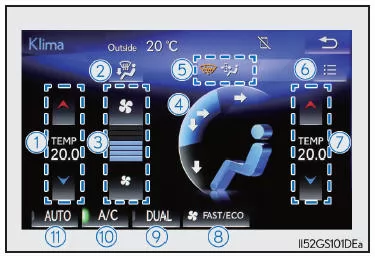
Control Screen
Without Rear Air Conditioning System
With Rear Air Conditioning System
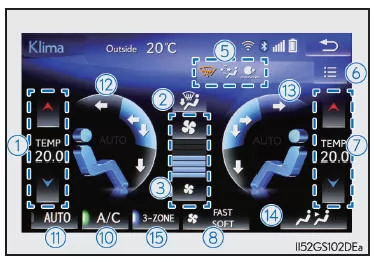
- Changing the Temperature Setting for the Left Side
- Selecting the Air Flow to the Footwell and Operating the Windshield Defogger
- Changing the Fan Speed Setting
- Selecting the Air Flow Mode* (for the front seats)
- Indicators for functions switched on/off on the options screen
- Displaying the Options Screen
- Changing the Temperature Setting for the Right Side
- Fan Speed Mode Selection Switch in Automatic Mode
- Setting the Temperature Separately for the Driver's Seat and Front Passenger's Seat (Two-Zone Operation)
- Switching the Cooling and Dehumidifying Function On/Off
- Switching Automatic Mode On/Off
- Selecting the Air Flow Mode* (for the left side)
- Selecting the Air Flow Mode* (for the right side)
- Displaying the Rear Air Conditioning Control Screen
- Setting the Temperature Individually for the Driver's Seat, Front Passenger's Seat and Rear Seats (Three-Zone Operation)
*:  Air flows to the upper body
 Air flows to the upper body and footwell
 Air flows to the footwell
■ Options Screen
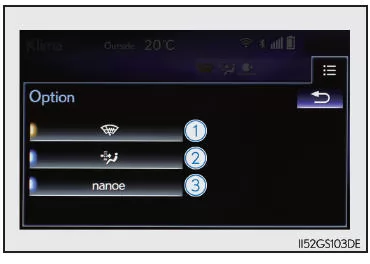
Select on the control screen to display the options screen. The functions can be switched on and off.
When the function is on, the indicator on the control screen lights up.
- Preventing ice build-up on the windshield and wiper blades (if equipped)
- Pollen filter (pollen filter mode)
- nanoe* system on/off (if equipped)
*: nanoe and the nanoe logo are trademarks of Panasonic Corporation.
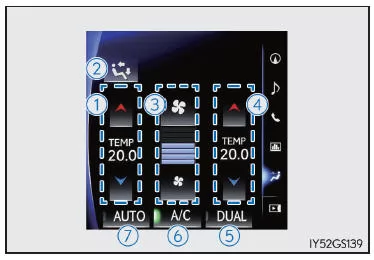
■ Side Display (Vehicles with 12.3-inch Display)
Without Rear Air Conditioning System
With Rear Air Conditioning System
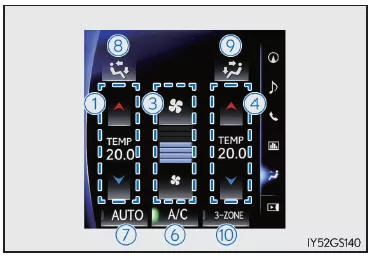
- Changing the Temperature Setting for the Left Side
- Selecting the Air Flow Mode (for the front seats)
- Changing the Fan Speed Setting
- Changing the Temperature Setting for the Right Side
- Setting the Temperature Separately for the Driver's Seat and Front Passenger's Seat (Two-Zone Operation)
- Switching the Cooling and Dehumidifying Function On/Off
- Switching Automatic Mode On/Off
- Selecting the Air Flow Mode (for the left side)
- Selecting the Air Flow Mode (for the right side)
- Setting the Temperature Individually for the Driver's Seat, Front Passenger's Seat and Rear Seats (Three-Zone Operation)
■ Rear Air Conditioning Control Screen (Vehicles with Rear Air Conditioning System)
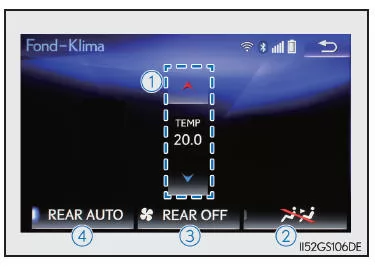
- Changing the Temperature Setting for the Rear Seats
- Deactivating the Switches on the Rear Armrest
- Turning Off the Blower (Rear Seat)
- Turning the Automatic Mode On/Off (Rear Seat)
Operating the Air Conditioning System
■ Using Automatic Mode
- Press
 or select "AUTO" on the operation screen.
The fan speed mode also changes each time "FAST/ECO" or
 is selected as follows:

- Press
 , to switch to automatic air flow mode.
The air conditioning system automatically switches between outside air mode and recirculated air mode.
- Change the temperature setting. To stop operation, press the "OFF" button.
The air outlets and fan speed for the driver and front passenger can be adjusted separately depending on the temperature setting.
When the front seat heaters and ventilators/rear seat heaters are set to "AUTO" mode, the system operates automatically according to the set temperature, outside temperature, etc.
■ Automatic Mode Indicator
When the fan speed or air distribution mode is set manually, the automatic mode indicator turns off. However, automatic mode remains active for the other functions that have not been set manually.
Additional functions
■ Switching Between Outside Air and Recirculated Air Modes
Press.
Each time the button is pressed, the mode changes between (recirculated air mode), automatic mode, and
 (outside air mode).
When the system is switched to automatic mode, the air conditioning system operates automatically.
■ Clearing Fog from the Windshield
The windshield defogger is used to clear fog from the windshield and front side windows.
Press .
If recirculated air mode is selected, press the outside/recirculated air mode switch button to change to outside air mode. (The change may occur automatically.) To clear fog from the windshield and side windows more quickly, increase the fan speed and temperature.
To return to the previous mode, pressagain once the windshield is clear.
■ Clearing Fog from the Rear Window and Outside Mirrors
The rear window defogger and outside mirror heaters are used to clear fog from the rear window and to remove raindrops, dew, or frost from the outside mirrors, respectively.
Press .
The rear window defogger and outside mirror heaters turn off automatically after 15 to 60 minutes. The operating time varies depending on the ambient temperature and vehicle speed.
■ Wiper De-icer (if equipped)
This function prevents ice from forming on the windshield and wiper blades.
Select on the options screen.
The wiper de-icer turns off automatically after approximately 15 minutes.
■ Pollen Filter Mode
Pollen is filtered out of the air, and the air flows out from the upper area.
Select on the options screen.
The system normally turns off automatically.
The dehumidification function may turn on to prevent the windshield from fogging when the outside air is too cold.
Pollen is filtered out even when pollen filter mode is off.
Changing Rear Seat Settings (on Vehicles with Rear Air Conditioning)
Select on the operation screen to display the rear air conditioning operation screen.
■ Using Automatic Mode
- Select "REAR AUTO" on the screen.
The air conditioning system turns on, and the air outlets and fan speed are adjusted automatically.
When the rear seat heaters are set to automatic mode, the system operates automatically according to the set temperature, outside temperature, etc.
- Change the temperature setting.
To stop operation, select "REAR OFF".
■ Changing the Temperature Setting
Select to increase the temperature and
 to decrease the temperature.
Each time "3-ZONE" is selected on the operation screen, the air conditioning system switches between individual mode and single-zone mode.
■ Disabling the Switches on the Rear Seat Armrest
Select .
The rear seat heater switches are also locked.
Air Outlets
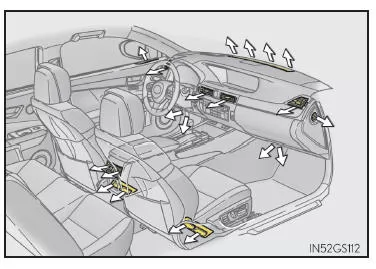
■ Air Outlet Layout
The air outlets and fan speed change depending on the selected air distribution mode.
■ Adjusting the Position and Opening/Closing the Air Outlets
Front center air outlets and front side air outlets
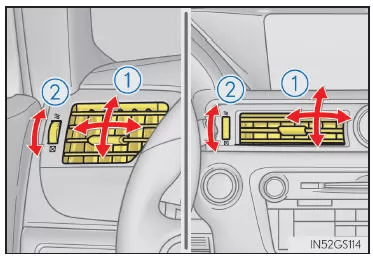
Rear seat air outlets
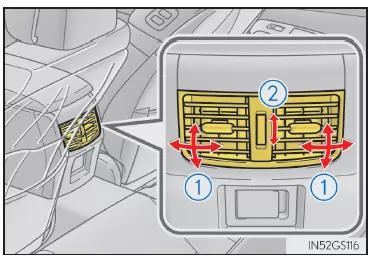
- Direct the airflow to the left, right, up, or down.
- Turn the dial to open or close the outlet.
■ Storing Air Conditioning Settings in Electronic Keys
- When you unlock the vehicle with an electronic key and set the engine switch to IGNITION ON mode, the air conditioning settings stored on that key are recalled.
- When the engine switch is turned off, the currently selected air conditioning settings are automatically stored on the electronic key that was used to unlock the vehicle.
- The system may not operate properly if multiple electronic keys are nearby, or if the smart access and start system is used to unlock a front passenger door.
- The settings for the electronic key and the associated door can be changed. Contact a Lexus dealer or repairer, or another qualified and properly equipped repair shop.
■ Using Automatic Mode
The fan speed is adjusted automatically according to the temperature setting and ambient conditions.
For this reason, the blower may stop for a while immediately after pressing until warm or cool air is available.
Due to sunlight, cool air may be blown from the upper area even when the heater is on.
■ Window Fogging
- When humidity inside the vehicle is high, the windows may fog up quickly. Pressing the "A/C" button dehumidifies the air discharged from the air outlets and effectively clears fog from the windshield.
- If the "A/C" button is off, the windows may fog up more easily.
- The windows may fog up when recirculated air mode is used.
■ Outside Air/Recirculated Air Mode
- Press the outside air/recirculated air mode switch to select recirculated air mode when driving on dusty roads, in tunnels, or in heavy traffic. This prevents outside air from entering the vehicle cabin. Selecting recirculated air mode when cooling also allows the cabin to be cooled effectively.
- Depending on the temperature setting or the cabin temperature, the system may switch automatically between outside air and recirculated air mode.
■ Automatic Air Intake Control Mode
In automatic mode, the system detects exhaust gases and other pollutant emissions and automatically switches between outside air and recirculated air mode.
If the dehumidification function is off and the blower is running, it is activated by turning on automatic mode.
■ Air conditioning operation in Eco mode
To keep fuel consumption low, the air conditioning is controlled as follows in Eco driving mode:
- Engine speed and compressor operation are controlled to limit heating/cooling output.
- The blower speed is limited when automatic mode is selected. To improve air conditioning performance, perform the following steps:
- Change the blower speed.
- Turn off Eco driving mode.
■ When S-FLOW Mode Is Operating
When air flows only to the driver's seat, the passenger's temperature setting is not displayed.
■ At Low Outside Temperatures
The dehumidification function may not operate even if "A/C" is selected on the options screen.
■ Ventilation and Air Conditioning Odors
- Set the air conditioning to outside air mode to let fresh air into the vehicle.
- During operation, various odors from outside and inside the vehicle can enter and accumulate in the air conditioning system. This can cause odors to be released from the air outlets.
- To prevent odors from occurring:
■ nanoe TM *1 System (if equipped)
Your vehicle is equipped with a nanoe TM device, which is classified as a biocidal product. The nanoe TM device generates charged water particles from the ambient air, which clean the cabin air by suppressing bacteria.
In the EU, the nanoe TM device is regarded as a biocidal product under Regulation (EU) No. 528/2012.
Active ingredient: Charged water particles (nano) generated from the ambient air, containing hydroxyl radicals. The nanoe TM device supplies purified air by releasing electrically charged water particles through the front center air outlet on the driver's side*2.
- When the blower is on and "nanoe" is selected on the options screen, the nanoe TM system is activated.
- System performance is maximized when the blower is operated under the following conditions. If the following conditions are not met, performance will be limited.
 ,
 or
 is used. The front center air outlet on the driver's side is open.
- During nanoe TM operation, a small amount of ozone is released, which may have a faintly noticeable odor. However, this amount is about the same as the amount already found in nature (e.g., in forests), and it has no effect on the human body.
- A faint noise may be audible during operation. This is not a malfunction.
*1: nanoe TM and the nanoe TM logo are trademarks of Panasonic Corporation.
*2: Depending on temperature and humidity conditions, blower speed, and airflow direction, the nanoe TM system may not operate at full capacity.
■ Air Conditioning Filter
■ Personal settings
You can change the settings (e.g., the sensitivity of the exhaust gas sensor).
WARNING
■ To Prevent the Windshield from Fogging Up
- Do not use cold air operation in extremely humid weather.
 Due to the temperature difference between the outside air and the windshield, the outside of the windshield may fog up and obstruct visibility.
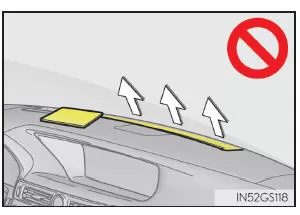
- Do not place objects on the instrument panel that could block the air outlets. The airflow would be obstructed, and the windshield defroster may not be able to clear the fog.
■ To Avoid Burns
Do not touch the surface of the outside mirrors while the outside mirror heaters are on.
■ nanoe TM Generator (if equipped)
Do not disassemble or repair the generator; it contains high-voltage components.
If the generator requires repair, contact a Lexus dealer or authorized repairer, or another qualified and properly equipped repair shop.
NOTE■ To Prevent Battery Discharge
Do not run the air conditioning longer than necessary with the engine off.
■ To Avoid Damage to the nanoe TM System (if equipped)
Do not insert objects into the driver's side air outlet, attach anything to the outlet, or use sprays in this area. Such objects may prevent the generator from functioning properly.
The automatic climate control of the Lexus GS GRL1 maintains a comfortable cabin climate by intelligently controlling temperature, air distribution and fan speed. The system can be adjusted easily and precisely using the 12.3-inch display or the control buttons. Zone control provides individual comfort for all passengers.
With features such as S-FLOW mode and the pollen filter, the fourth-generation Lexus GS demonstrates its commitment to maximum efficiency and comfort. Innovative details such as the nanoe system also contribute to a pleasant cabin atmosphere.
The combination of high technology and ease of use makes the Lexus GS 2016–2020 the ideal choice for drivers who value comfort and modern technology.
Test yourself
A quick Lexus GS quiz: every answer comes with an explanation and a link to the manual page.