Sirius Satellite Radio Antenna Feeder Inspection
SIRIUS satellite radio antenna feeder No.1 is integrated with the dashboard wiring harness.
1. Disconnect the negative battery cable..
2. Remove the following parts:
a. Passenger-side front scuff plate.
b. Passenger-side front side trim.
c. Dashboard under cover.
d. Grove compartment.
e. Passenger-side lower panel.
f. A-pillar trim (RH).
3. Disconnect the SIRIUS satellite radio antenna feeder connector..
4. Disconnect the antenna feeder No.2.
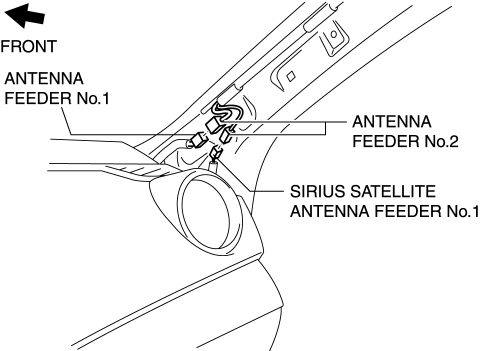
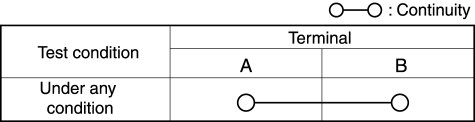
5. Verify that the continuity between SIRIUS satellite radio antenna feeder No.1 terminals is as indicated in the table.
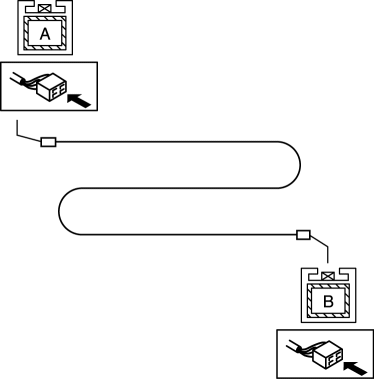
If not as indicated in the table, replace dashboard wiring harness.
SIRIUS Satellite Radio Antenna Feeder No.2 NOTE:
SIRIUS satellite radio antenna feeder No.2 is integrated with the antenna feeder No.2.
1. Refer to ANTENNA FEEDER NO.2 INSPECTION.
SIRIUS Satellite Radio Antenna Feeder No.3 NOTE:SIRIUS satellite radio antenna feeder No.3 is integrated with the antenna feeder No.3.
1. Refer to ANTENNA FEEDER NO.3 INSPECTION.
Test yourself
A quick Mazda 3 quiz: every answer comes with an explanation and a link to the manual page.