Multi-function display warnings and indicators
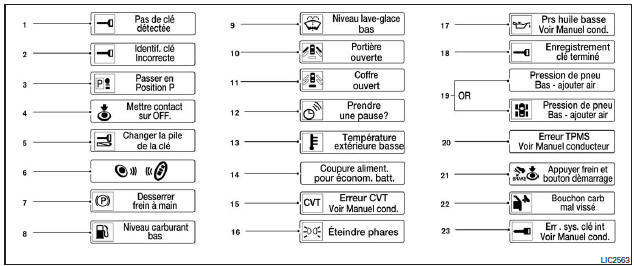
- No key detected
- Incorrect key indicator
- Shift to P (Park)
- Turn ignition to OFF
- Replace key battery
- Engine start for Intelligent Key system
- Release parking brake
- Low fuel level
- Low washer fluid level
- Door open
- Trunk open
- Timer alert - Take a break?
- Low outside temperature
- Power supply cut to save battery
- CVT error (continuously variable transmission malfunction)
- Turn off headlights
- Low oil pressure
- Key registration complete
- Low tire pressure - add air (if equipped)
- TPMS error
- Remote Start (if equipped)
- Fuel Filler Cap Not Tightened
- Intelligent Key system error: see Owner's Manual
No key detected
This warning appears when the Intelligent Key is outside the vehicle and the ignition switch is in the ON or ACC (accessory) position. Make sure the Intelligent Key is inside the vehicle.
Incorrect key indicator
This warning appears when the ignition switch is moved from the OFF position and the system does not detect the Intelligent Key. You cannot start the engine using an unregistered key.
See "NISSAN Intelligent KeyMD" in the "Pre-driving checks and adjustments" chapter for more information.
Shift to P (Park)
This warning appears when the ignition switch is in the ACC (accessory) or OFF position and the selector lever is in a position other than P (Park). In addition, a chime sounds when the ignition switch is in the OFF position.
If this warning appears, move the selector lever to P (Park) or start the engine.
For more information on the Intelligent Key, see "NISSAN Intelligent KeyMD" in the "Pre-driving checks and adjustments" chapter.
Turn ignition to OFF
When the Turn ignition to OFF warning is displayed, it stays on if the ignition switch is in the ACC (accessory) position and the selector lever is moved to P (Park).
To turn off the Turn ignition to OFF warning, move the ignition switch to the ON position, then to the LOCK position.
Replace key battery
This indicator comes on when the Intelligent Key battery is almost discharged.
If this indicator comes on, replace the Intelligent Key battery. See "Battery replacement" in the "Maintenance and do-it-yourself" chapter.
Engine start for Intelligent Key system
This indicator appears when the Intelligent Key battery is low and the Intelligent Key system and the vehicle are not communicating normally.
If this indicator appears, touch the ignition switch with the Intelligent Key while depressing the brake pedal. For more information, see "Intelligent Key battery depletion" in the "Starting and driving" chapter.
Release parking brake
This warning appears in the message area of the multi-function display when the parking brake is applied and the vehicle is moving.
Low fuel level
This warning comes on when the fuel level is low. Refuel as soon as possible, preferably before the fuel gauge needle reaches the 0 (empty) mark. When the gauge needle reaches the 0 (empty) mark, the fuel tank of your vehicle contains only a small reserve of fuel.
Low washer fluid level
This warning comes on when the washer fluid level is low. Add the required amount of washer fluid. See "Windshield washer fluid" in the "Maintenance and do-it-yourself" chapter of this manual.
Door open
This warning comes on when a door is opened while the engine is running.
Trunk open
This warning comes on when the liftgate is opened while the engine is running.
Timer alert - Take a break?
This indicator appears when the timer reaches the set time. The timer can be set for a maximum of six hours.
To set the timer, see "Timer alert" in this chapter.
Low outside temperature
This warning appears if the outside temperature is below 3 °C (37 °F). You can change the temperature display to degrees Celsius or Fahrenheit. See "Temperature" above in this chapter.
Power supply cut to save battery
This warning appears in the message area of the multi-function display after a certain time if the selector lever has not been moved from the P (Park) position.
CVT error. See Owner's Manual
This warning comes on in the event of a malfunction in the continuously variable transmission system. If this warning appears, have the system checked by a NISSAN dealer.
Turn off headlights
This warning appears when the headlights are not turned off after the vehicle is exited. Move the headlight switch to the OFF or AUTO position. For additional information, see "Headlight and turn signal switch" in this chapter.
Low oil pressure
This warning appears in the message area of the multi-function display when low oil pressure is detected. This indicator is not designed to indicate that the engine oil level is low. The low oil pressure warning is not designed to indicate that the oil level is low.
Use the dipstick to check the engine oil level.
Refer to the "Engine Oil" section in the "Maintenance and Do-It-Yourself" chapter.
Key registration complete
This message appears when a new Intelligent Key is registered to the vehicle.
Low tire pressure - add air (if equipped)
This warning appears when the low tire pressure warning light illuminates on the instrument panel and low tire pressure is detected. The warning message appears whenever the ignition switch is in the ON position as long as the low tire pressure warning light remains on. If this warning appears, stop the vehicle and adjust the pressure of all four tires to the recommended COLD inflation pressure shown on the tire and loading information label. Refer to "Low tire pressure warning light" earlier in this chapter and "Tire Pressure Monitoring System" in the "Starting and Driving" chapter.
TPMS error
This warning appears when there is a malfunction in the Tire Pressure Monitoring System. If this warning appears, have the system checked by a NISSAN dealer.
Push the engine start button (if equipped)
This warning appears on the multi-function display when the vehicle is started using the remote engine start function. To drive the vehicle, apply the parking brake and turn the ignition switch to the ON position.
Fuel Filler Cap Not Tightened
This warning appears when the fuel filler cap is not tightened properly after refueling. Refer to "Fuel filler cap" in the "Pre-Driving Checks and Adjustments" chapter of this manual.
Intelligent Key Error
When the ignition switch is pushed to the ON position, this light illuminates for about two seconds and then turns off.
The Intelligent Key system error message warns the driver that there is a malfunction in the Intelligent Key system. If the light illuminates when the engine is not running, it may not be possible to start the engine.
If the light illuminates while the engine is running, you may continue driving. In this case, have the malfunction repaired by a NISSAN dealer as soon as possible.
Test yourself
A quick Nissan Altima quiz: every answer comes with an explanation and a link to the manual page.