Blind Spot Warning System Operation

The Blind Spot Warning system operates when the speed is above approximately 32 km/h.
When the camera detects vehicles in the detection area, the Blind Spot Warning indicator located inside the outside mirrors illuminates. If the turn signal is then activated, the system sounds a chime (twice) and the Blind Spot Warning indicator flashes to alert the driver.
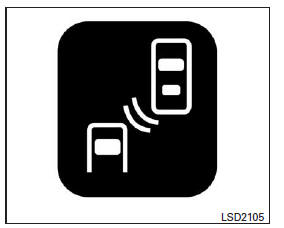
Blind Spot Warning Indicator
The Blind Spot Warning indicator continues to flash until the detected vehicles leave the detection area.
Detection Area
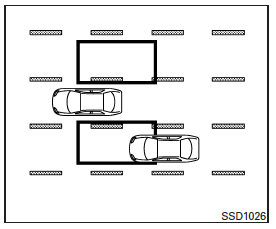
The camera can detect vehicles on the left and right sides of your vehicle when a part of another vehicle is in the detection area, as illustrated.
This detection area generally starts from the outside mirror of your vehicle and extends to approximately 3.0 m (10 ft) behind the rear bumper, and approximately 3.0 m (10 ft) to the side.
NOTE:
The Blind Spot Warning indicator illuminates for a few seconds when the ignition is switched on.
The brightness of the Blind Spot Warning indicators is adjusted automatically according to the ambient light level.
A chime sounds if the camera has already detected vehicles when the driver activates the turn signal. If a vehicle enters the detection area after the driver activates the turn signal, only the Blind Spot Warning indicator flashes and no chime sounds. (Refer to "Blind Spot Warning System Driving Situations" later in this section.)
Blind Spot Warning System On/Off Setting
The Blind Spot Warning system is turned on or off using the settings menu on the multi-function display.
SYSTEM ON:
The Blind Spot Warning indicator illuminates on the instrument panel.
SYSTEM OFF:
The Blind Spot Warning indicator goes off on the instrument panel.
- Press the button

until the "Settings" option appears on the multi-function display. Use the buttons to select "
Driver Assistance ". Press the ENTER button. - Select the "Driving Aids" option, then press the ENTER button.
- To set the Lane Departure Warning system to on or off, use the buttons
 to
navigate the menu and press the ENTER button to make a selection or change an option:
- Select "Blind Spot" and press the ENTER button.
- To turn on the warning, use the ENTER button to check the box for the "Warning (BSW)" option (Blind Spot Warning).
The warning systems switch is used to temporarily turn off the warning systems: the Lane Departure Warning (LDW) system and the Blind Spot Warning (BSW) system, which are turned on using the settings menu on the multi-function display. Refer to "Warning systems switch" in the "Controls and instruments" chapter.
WARNING
The camera may not detect certain objects such as:
- pedestrians, bicycles, animals;
- certain types of small vehicles such as motorcycles and very compact vehicles;
- oncoming vehicles;
- vehicles approaching rapidly from behind (refer to "Blind Spot Warning system driving situations" later in this chapter);
- vehicles that your vehicle passes quickly (refer to "Blind Spot Warning system driving situations" later in this chapter);
- vehicles that change lanes quickly right next to your vehicle.
- The camera may not correctly detect a long-wheelbase vehicle (for example, a trailer truck, semi-trailer, tractor) when your vehicle is moving alongside the middle section of such a vehicle.
- The camera detection zone is designed for a standard lane width. When driving in a wider lane, the camera may not detect vehicles in an adjacent lane. When driving in a narrow lane, the camera may detect vehicles two lanes away.
- The camera is designed to ignore most stationary objects; however, objects such as guardrails, walls, foliage and parked vehicles may sometimes be detected.
This is normal operation.
Test yourself
A quick Nissan Altima quiz: every answer comes with an explanation and a link to the manual page.