Using the multi-function display
In this manual: Using the multi-function display
3steps
~18min
2/5difficulty
Done 0 of 3
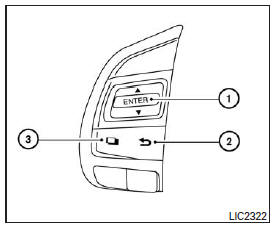
The multi-function display can be operated using the and ENTER buttons
located on the steering wheel.
 - scroll through vehicle information options
ENTER - change or select an option on the multi-function display - return to the previous
menu - select/enter vehicle information menu options or switch from one display screen to the next (e.g., trip odometer, tire pressure monitoring system, fuel economy)
The ENTER and
buttons also control audio and control unit functions. For more information, refer to "Steering Wheel Audio Control" in the "Monitor, Climate, Audio, Phone and Voice Recognition Systems" chapter.
Test yourself
A quick Nissan Altima quiz: every answer comes with an explanation and a link to the manual page.
Was this page helpful?