Changing the Display
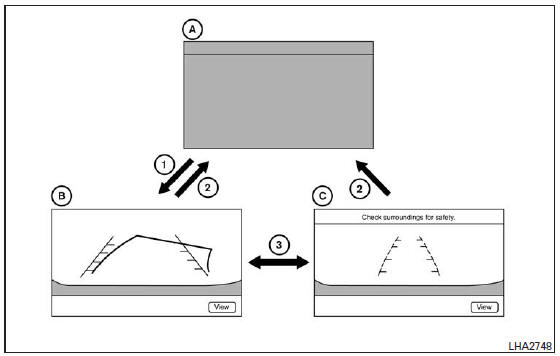
- Original screen before the rear view camera operates
- Wide-angle rear view screen
- Rear view screen
- The selector lever is moved to the R (Reverse) position
- The selector lever is moved out of the R (Reverse) position
- Select the "View" key on the screen
- When the selector lever is moved to the R (Reverse) position 1 while another screen A is displayed, the rear view camera is activated and the wide-angle rear view B is displayed.
- When you select the "View" key on the screen using the multi-function selector and then press the ENTER button 3, the screen changes to the rear view screen C.
When you press the "View" key 3 again, the wide-angle rear view B is displayed.
- The wide-angle rear view screen or the rear view screen changes to another screen A when the selector lever is moved out of the R (Reverse) position.
Rear View
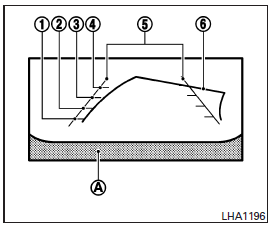
The screen displays guide lines that indicate the vehicle width and the distances to obstacles from the bumper line A.
Distance guide lines:
Indicate the distances from the bumper.
- Red line 1: approx. 0.5 m (1.5 ft)
- Yellow line 2: approx. 1 m (3 ft)
- Green line 3: approx. 2 m (7 ft)
- Green line 4: approx. 3 m (10 ft)
Vehicle width guide lines 5 :
Indicate the vehicle width when reversing.
Predicted course lines 6 (rear view only):
Indicate the predicted course when reversing.
The predicted course lines are displayed on the screen when the selector lever is in the R (Reverse) position and you turn the steering wheel. The predicted course lines move according to the steering wheel angle and are not displayed when the steering wheel is in the neutral position.
Wide-Angle Rear View
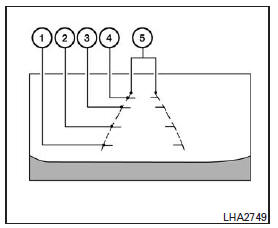
The wide-angle rear view shows an area of approximately 180 degrees. The predicted course lines are not displayed in the wide-angle rear view.
Distance guide lines:
Indicate the distance from the bumper.
- Red line 1: approx. 0.5 m (1.5 ft)
- Yellow line 2: approx. 1 m (3 ft)
- Green line 3: approx. 2 m (7 ft)
- Green line 4: approx. 3 m (10 ft)
Vehicle width guide lines 5 :
Indicate the vehicle width when reversing.
Test yourself
A quick Nissan Altima quiz: every answer comes with an explanation and a link to the manual page.