Tire Pressure Sensor Id Registration
Description
This procedure must be performed.
After replacement of a tire pressure sensor or BCM.
After replacement of tire or road wheel.
After performing tire rotation.
Work Procedure
TPMS REGISTRATION WITH TIRE PRESSURE SENSOR ACTIVATION TOOL [KV48105501 (J-45295-A)]
With CONSULT
Ignition switch ON.
Select “WORK SUPPORT” in AIR PRESSURE MONITOR. Then, select “ID registration.”
Touch “Start” on “ID REGIST” screen.
Hold the tire pressure sensor activation tool [KV48105501 (J-45295-A)] (A) against the side of the left front tire, near the valve.
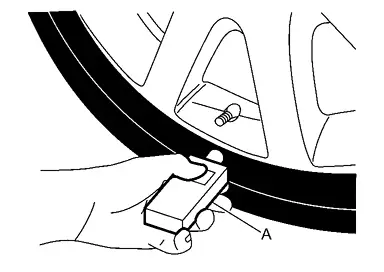
With the tool held at a 0 to 15 degree angle to the tire, press and hold the tire pressure sensor activation tool button until the indicator lamp turns OFF (approximately 5 seconds).
Repeat steps 4 and 5 for the remaining tires in this order: right front, right rear and left rear.
When ID registration is complete, check the following pattern at each wheel.
Sequence ID registration position Turn signal lamp CONSULT 1 Front LH 2 blinks “Yet (red)”
↓
“Done (green)”2 Front RH 3 Rear RH 4 Rear LH After the ID registration procedure for all wheels is complete, press “End” on the CONSULT to finish ID registration.
TPMS REGISTRATION WITH SIGNAL TECH II TOOL (J-50190)
With CONSULT
Adjust the tire pressure for all tires to the recommended value. Refer to TIRE AIR PRESSURE : Service Data.
Ignition switch ON.
Using CONSULT, select “WORK SUPPORT” in AIR PRESSURE MONITOR. Then, select “ID registration.”
Select “Start” on “ID REGIST” screen.
Turn on the Signal Tech II tool (J-50190).
Hold the Signal Tech II against the side of the left front tire, near the valve.
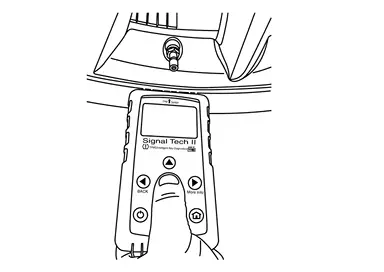
With the tool held at a 0 to 15 degree angle to the tire, select “Activate Sensor” from the main menu, then press and release the “OK” button to activate the sensor. Once the sensor is activated, the vehicle parking lamps will flash and the sensor ID will appear on the CONSULT screen.
Repeat steps 6 and 7 for the remaining tires in this order: right front, right rear and left rear.
When ID registration is complete, check the following pattern at each wheel.
Sequence ID registration position Turn signal lamp CONSULT 1 Front LH 2 blinks “Yet (red)”
↓
“Done (green)”2 Front RH 3 Rear RH 4 Rear LH Once all sensors have been activated, select “End” on the CONSULT to finish ID registration.