Interactive mechatronic chassis
Flex Ride
The Flex Ride mechatronic chassis allows the driver to select one of three driving modes:
- SPORT mode: press the SPORT button, the LED illuminates.
- TOUR mode: press the TOUR button, the LED illuminates.
- NORMAL mode: neither the SPORT nor the TOUR button is pressed, no LED is illuminated.
SPORT and TOUR modes are deactivated by pressing the corresponding button once more.
Each Flex Ride mode networks the following electronic systems:
- Electronic damping control.
- Accelerator pedal control.
- Steering control.
- All-wheel drive.
- Electronic Stability Control (ESC).
- Anti-lock Braking System (ABS) with Cornering Brake Control (CBC).
- Automatic transmission.
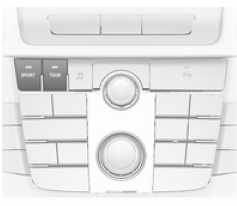
Sport mode
The system settings are adapted to a sportier driving style:
- the shock absorber suspension becomes firmer to provide better contact with the road surface;
- the engine responds more quickly to the accelerator pedal;
- steering assistance is reduced;
- more of the all-wheel drive engine torque is transmitted to the rear axle;
- the automatic transmission shift points occur later;
- with SPORT mode activated, the lighting of the main instruments changes from white to red.
TOUR mode
The system settings are tuned for a more comfortable driving style:
- the shock absorber suspension responds more softly;
- the accelerator pedal responds according to the standard settings;
- the steering assistance is normal;
- the engine torque of the all-wheel drive is mainly transmitted to the front axle;
- the automatic transmission shifts occur more smoothly;
- the main instrument lighting is white.
NORMAL mode
All system settings correspond to the standard values.
Driving Mode Control
In every driving mode, the Driving Mode Control (DMC) continuously detects and analyses the actual driving characteristics, the driver's inputs and the current dynamic state of the vehicle.
If necessary, the DMC control module automatically changes the settings within the selected driving mode or, if large variations are detected, the driving mode is changed depending on the extent of the variations.
For example, if NORMAL mode is active and the DMC detects a sporty driving style, the DMC changes several NORMAL mode settings to sport settings. The DMC switches to SPORT mode if the driving style is clearly sporty.
For example, if TOUR mode is active and sudden braking is required on a winding road, the DMC detects the dynamic state of the vehicle and switches the suspension settings to SPORT mode to improve vehicle stability.
When the driving characteristics or the dynamic state of the vehicle return to their initial state, the DMC restores the settings of the previously selected driving mode.
Customised SPORT mode settings
The driver can select the SPORT mode functions when the SPORT button is pressed. These settings can be changed in the Settings menu of the information display.
Vehicle personalisation 116.
Flex Ride - OPC Version
The OPC version of the Flex Ride mechatronic chassis works in the same way as the standard Flex Ride system, except that the modes offer sportier driving characteristics.
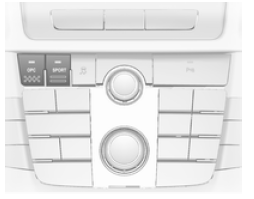
The OPC Flex Ride mechatronic chassis allows the driver to select from three driving modes:
- OPC mode: press the OPC button, the LED lights up.
- SPORT mode: press the SPORT button, the LED illuminates.
- NORMAL mode: neither the SPORT nor the OPC button is pressed, no LED is lit.
To deactivate SPORT or OPC mode, press the corresponding button once more.
Each mode of the OPC Flex Ride networks the following electronic systems:
- Electronic damping control.
- Accelerator pedal control.
- Steering control.
- All-wheel drive.
- Electronic Stability Control (ESC).
- Anti-lock Braking System (ABS) with Cornering Brake Control (CBC).
- Automatic transmission.
NORMAL mode
In NORMAL mode, neither the SPORT nor the OPC button is pressed, and all system settings correspond to the standard values.
Sport mode
The system settings are tuned for a sportier driving style.
OPC mode
The driving characteristics and dynamic state are adjusted to high performance values.
In this mode, the main instrument lighting changes to red.
Customised OPC mode settings
The driver can select the OPC mode functions when the OPC button is pressed. These settings can be changed in the Settings menu of the information display.
Vehicle personalisation 116.
Test yourself
A quick Opel Insignia quiz: every answer comes with an explanation and a link to the manual page.