General information
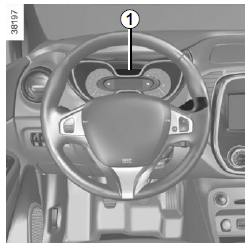
Trip computer 1
Depending on the vehicle, it combines the following functions:
- distance travelled;
- journey parameters;
- information messages;
- operating fault messages (associated with the warning light
 ) ;
- warning messages (associated with the warning light
 ) ;
- vehicle settings personalisation menu.
All these functions are described on the following pages.

Display selection buttons 2 and 3
Scroll up (button 2) or down (button 3) through the following information by briefly pressing the buttons in succession (the display depends on the vehicle equipment and country).
- Total and trip odometer;
- Fuel used;
- average fuel consumption;
- Instantaneous fuel consumption;
- estimated range;
- Distance travelled;
- average speed;
- Service range:
- service reminder counter;
- oil change counter;
- speed limiter/cruise control set speed;
- Time and temperature;
- Trip log, scrolling through information and operating fault messages.
Resetting the trip odometer
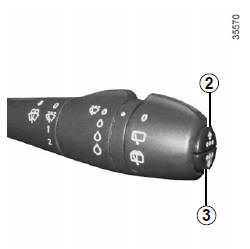
With the display set to "total and trip odometer", press button 2 or 3 repeatedly until the trip odometer is reset to zero.
Resetting trip parameters (trip start)
With the display set to one of the trip parameters, press and hold button 2 or 3 until the display is reset to zero.
Interpreting certain values displayed after a trip start
The average fuel consumption, range and average speed values become more stable and meaningful the greater the distance driven since the last Top Départ.
During the first kilometres driven after a trip start, you may notice that the range increases as you drive. This is because it takes into account the average consumption since the last trip start.
However, average fuel consumption may decrease when:
- The vehicle is coming out of an acceleration phase;
- the engine reaches its operating temperature (Top Départ: cold engine);
- You are switching from urban driving to road driving.
Automatic resetting of the trip parameters
The reset is automatic when the capacity of one of the 2 parameters is exceeded.
Test yourself
A quick Renault Captur quiz: every answer comes with an explanation and a link to the manual page.