Operation
RENAULT card with remote control: operation
Unlocking the openings
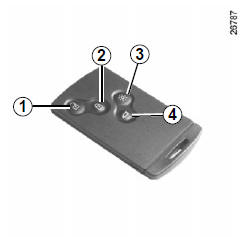
Press button 1.
Unlocking is indicated by the hazard warning lights flashing.
Locking the doors
Press lock button 2.
Locking is indicated by the hazard warning lights flashing twice.
If an opening (door or boot) is open or not properly closed, or if a RENAULT card has been left in the card reader, the vehicle locks and then immediately unlocks again, with no hazard warning light flashing.
If the vehicle has been unlocked but no opening has been opened, it locks again automatically after two minutes.
With the engine running, the card buttons are disabled.
The hazard warning lights flash to indicate the vehicle's status:
- one flash indicates that the vehicle is fully unlocked;
- two flashes indicate that the vehicle is fully locked.
Unlocking/locking the boot only
Press button 4 to unlock/lock the boot.
RENAULT card not detected alarm
If you open a door with the engine running and the card is not in the reader, the message "card not detected" and an audible signal warn you.
The warning stops when the card is put back in the reader.
"Remote lighting" function
Pressing button 3 turns on the interior lighting for approximately 30 seconds.
This makes it easier to locate the vehicle from a distance, for example in a car park.
Note: pressing button 3 again turns the lighting off.
RENAULT "hands-free" card: operation
Operation
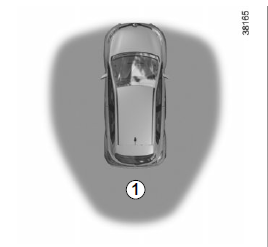
For vehicles so equipped, in addition to the functions of the RENAULT card with remote control, it allows locking/unlocking without any action on the card when it is present in access zone 1.
Do not store the RENAULT card where it could come into contact with other electronic equipment (computer, PDA, telephone, etc.) that may interfere with operation.
Unlocking the vehicle
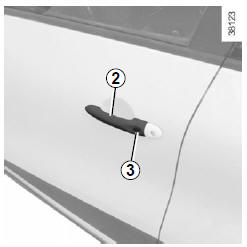
With the RENAULT card in zone 1 and the vehicle locked, press button 3 on handle 2 of either front door: the vehicle unlocks.
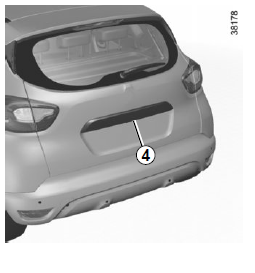
Pressing button 4 also unlocks the entire vehicle.
Unlocking is indicated by the hazard warning lights flashing.
Note: for three seconds after unlocking by pressing button 3, locking is inhibited.
After unlocking the vehicle using the button on the RENAULT card, "hands-free" locking and unlocking are disabled.
To return to hands-free operation, restart the vehicle.
Locking the vehicle
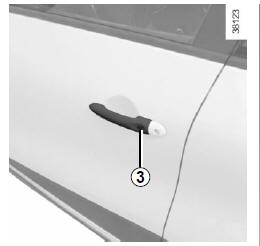
You have three ways to lock the vehicle: by walking away, using button 3, or using the RENAULT card.
Locking when walking away
With the RENAULT card on you and the doors and boot closed, walk away from the vehicle: it locks automatically as soon as you leave zone 1.
Note: the distance at which the vehicle locks depends on the environment.
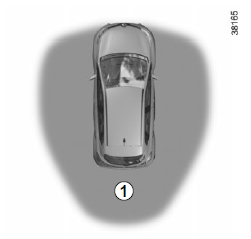
Locking is confirmed by two flashes of the hazard warning lights and an audible signal.
This audible signal can be switched off.
Consult an authorised dealer.
If an opening (door or tailgate) is open or not properly closed, or if a card is inside the passenger compartment (or in the card reader), the vehicle does not lock.
In this case, there is no audible signal and no hazard warning light flashes.
Locking using button 3
With the doors and tailgate closed and the vehicle unlocked, press button 3 on the handle of one of the front doors. The vehicle locks.
Note: a RENAULT card must be present in the access zone (zone 1) of the vehicle to allow locking using the button.
Note: for three seconds after locking by pressing button 3, unlocking is inhibited.
Locking using the RENAULT card
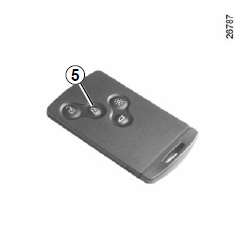
With the doors and boot closed, press button 5: the vehicle locks.
Locking is indicated by the hazard warning lights flashing twice.
Note: the maximum distance at which the vehicle locks depends on the environment.
Special notes
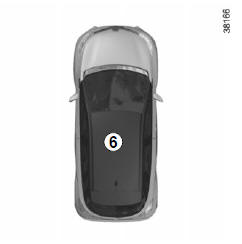
The vehicle cannot be locked if:
- an opening (door or boot) is open or not properly closed;
- a card has been left in zone 6 (or in the card reader) and no other card is within the external detection zone.
After locking/unlocking the vehicle using the buttons on the RENAULT card, hands-free locking and unlocking are deactivated.
To restore hands-free operation: restart the vehicle.
RENAULT "Hands-free" card not detected warning
With the engine running, if you open and close a door when the card is no longer in zone 6, the message "card not detected" and an audible signal warn you.
The warning disappears when the card is back in zone 6.
Driver's responsibility
Never leave your vehicle with the RENAULT card inside and a child (or an animal) left in it, even for a short time.
The child could endanger themselves or others by starting the engine, operating equipment such as the power windows, or locking the doors.
Risk of serious injury.
Test yourself
A quick Renault Captur quiz: every answer comes with an explanation and a link to the manual page.